EditnShip vs Descript: Which Costs Less to Run? (2026 Credit Math)
 RH FardinMaker of EditnShip · Updated November 12, 2026
You edit talking videos on a Mac. Your Descript credits run out before the month does.
Should you switch to EditnShip?
Most comparisons put two feature lists side by side and stop there. This EditnShip vs Descript comparison gives you a straight answer, the credit math behind it, and real prices checked on November 12, 2026.
One thing first: I built EditnShip, after my own Descript credits ran out. So I'll also show you exactly where Descript is the better pick.
Let's get started.
Key takeaways
- By my math, Descript's Hobbyist plan cleans up as few as 6 long videos a month before its credits run out. EditnShip's clean-up tools have no limit.
- The EditnShip Mac app is $29 once. Descript's yearly plans cost $192 to $600 per person, every year.
- Descript caps media at 10, 30 or 40 hours a month. The EditnShip Mac app has no media cap.
- Descript does 4 big things EditnShip can't. It has a Windows app, remote recording for 10 people, Eye Contact and AI background removal.
EditnShip vs Descript at a glance
| EditnShip | Descript | |
|---|---|---|
| Price | Mac app $29 once. Optional plans with AI credits from $15 a month | $16 to $50 a month billed yearly, $24 to $65 month to month, per person |
| Free option | No free plan. 14-day refund on the Mac app, 7-day trial on plans | Free plan: 1 media hour a month, 720p, with a watermark |
| Runs on | Mac with an M1 chip or newer, macOS 14+. Plans add a browser editor | Mac, Windows and the browser |
| Media limit | None in the Mac app | 10, 30 or 40 hours a month |
| Edit video by editing text | Yes | Yes |
| Filler word removal | 5 languages, on your Mac. No credits | English only. Up to 30 credits per file |
| Sound cleanup | On your Mac. No credits | Studio Sound. Up to 30 credits per file, needs internet |
| AI helper you type to | Shipmate, or your own Claude app | Underlord, or your own AI app |
| Transcribe without internet | Yes, after a one-time download | No, files upload first |
| 4K export | Included | Creator plan and up |
| Remote guests | No | Rooms, up to 10 people |
| Eye Contact | No | Yes |
| Background | Blur, or key out a real green screen | AI background removal |
| Translation | 15 languages, dubbing in the Mac app | Captions in 61 languages, dubbing in 30 |
| Team editing | No | Shared drives and live cursors |
| Scheduled short videos | Auto Post, with your own AI and stock footage accounts | Not on its pricing page |
| Best for | One person on a Mac who makes a lot of videos | Teams, remote interviews and Windows users |
long videos a month on Descript Hobbyist, if each one hits the 30-credit cap
once for the EditnShip Mac app, with 4K export and no media cap
edit requests passed with Claude Opus 5.5 in my own test, November 10, 2026
EditnShip vs Descript: The Difference
Both are text-based video editors. That means the app types out everything you say, and you edit the video by editing the text.
Delete a sentence, and the video cuts with it.
So what's different? Where the work happens, and how you pay for it.
What is Descript?
Descript is a video and podcast editor that works in the cloud. It runs on Mac, Windows and in a web browser. You pay by the month or the year, per person.
Each plan gives you media hours and AI credits. Media hours are how much video you can add each month. Credits are what Descript's AI tools spend.

Official Descript screenshot, from descript.com.
Want more options? See the 10 best Descript alternatives.
What is EditnShip?
EditnShip is a Mac app. You buy it once for $29, and it runs on your Mac, so most tools work without internet.
There are also monthly plans, from $15. They add AI credits for Shipmate, EditnShip's AI helper, plus a browser editor.
The plans and the Mac app are sold separately. Most people who edit alone only need the app.
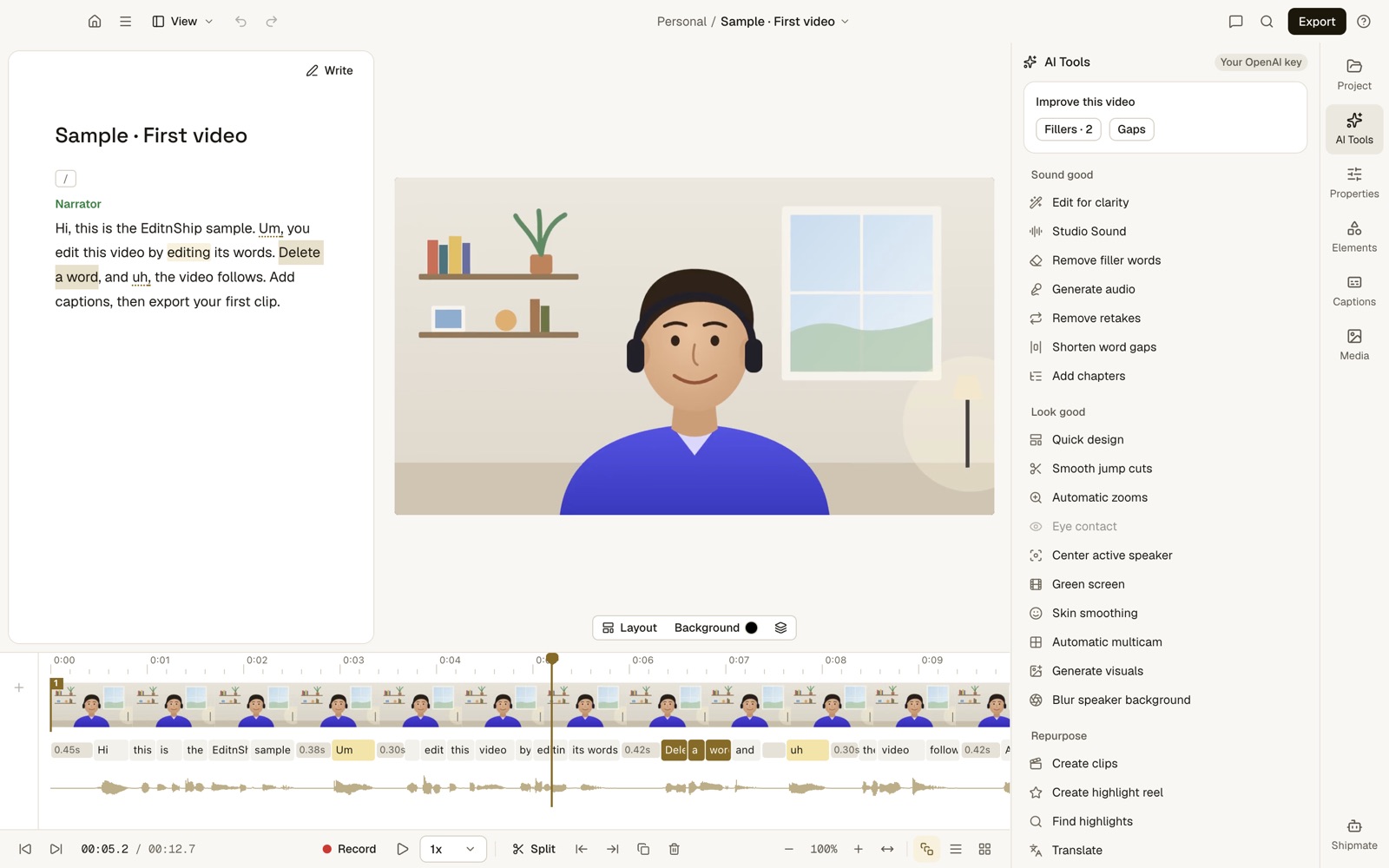
What to notice: each word in the transcript sits under its frames on the timeline. Delete the word, and those frames go too.
Which One Costs Less to Run?
EditnShip, for almost everyone who edits alone.
But the price tag is only part of it. To see what you really pay, you need to count 3 things.
Step #1: Count what you pay up front
EditnShip's Mac app is $29 once. You pay again only if you add a monthly plan.
Descript's cheapest paid plan is Hobbyist. It's $16 a month billed yearly, which is $192 a year. Month to month, it's $24, or $288 a year.
What to notice: one year of Descript's cheapest yearly plan costs more than 6 copies of the EditnShip Mac app. Yearly billing, per person. Descript prices from descript.com/pricing, November 12, 2026.
There's one catch. AI in the $29 app needs your own AI account, such as OpenAI, and you pay that company for what you use. Or you skip AI and edit by hand.
The monthly plans include AI credits instead, so you don't need an account of your own.
Step #2: Count the Descript credits each video uses
Most comparisons skip this step.
Descript charges credits for its clean-up tools. Its help center says the cost grows with the job: longer audio, or more filler words removed. Studio Sound and Remove Filler Words each stop at 30 credits per file.
Descript doesn't say how long a video must be to hit that cap. Here, a long video means one that hits it.
Here's why that matters:
A long video can take 30 credits for Studio Sound and 30 more for filler removal. That's 60 credits before you ask Underlord, Descript's AI helper, a single question.
And Descript charges again each time you run a tool. So I did the math for every plan:
| Plan | AI credits | Long videos cleaned up once | Cleaned up twice |
|---|---|---|---|
| EditnShip Mac app | Not needed | No limit | No limit |
| Descript Free | 100, once | 1, ever | 0 |
| Descript Hobbyist | 400 a month | 6 a month | 3 a month |
| Descript Creator | 800 a month | 13 a month | 6 a month |
| Descript Business | 1,500 a month | 25 a month | 12 a month |
That last column looks a lot like what happened to me.
On Descript's basic plan, I paid about $25 a month. After two or three videos, my AI credits were gone. After that, I couldn't clean up my voice.
And on Hobbyist, you can't buy more credits. Top-ups are only for Creator and Business. So when your credits are gone, you wait for next month or upgrade.
In EditnShip, filler removal and sound cleanup run on your Mac. They never touch credits, so you can run them on every version of every video.
How I got these numbers
I took each plan's AI credits from Descript's pricing page on November 12, 2026. Then I divided them by 60. That's the 30-credit cap for Studio Sound plus the 30-credit cap for Remove Filler Words, from Descript's help center. "Twice" means running both tools again on a second version of the same video (120 credits). These are Descript's current plans; older plans count usage differently.
Shorter videos cost less than the cap, so you'd fit more of them. Underlord messages also use credits, and Descript doesn't publish how many, so I left them out. With Underlord, your real number is lower.
Step #3: Count the media hours
Descript also limits how much video you can add each month: 10 hours on Hobbyist, 30 on Creator and 40 on Business.
The EditnShip Mac app has no media limit. You can add as much video as your Mac can hold.
The bottom line?
If you make a lot of videos, Descript's limits add up fast. The EditnShip Mac app has none of them.
What Each One Costs
Here are the full price lists, checked on November 12, 2026.
EditnShip prices
| Option | Monthly | Yearly | AI credits |
|---|---|---|---|
| Mac app | $29 once, with updates | None. Use your own AI account, or no AI | |
| Starter | $15 | $126 | 100 a month |
| Pro | $29 | $243.60 | 200 a month |
| Advanced | $69 | $579.60 | 500 a month |
Yearly plans get the whole year's credits at once. Full details on the pricing page.
Each plan's first week is $1, with 10 credits. Every plan unlocks every feature, but some only work in the Mac app.
Want both? Buy the Mac app too, and it can spend your plan's credits.
The $29 Mac app comes with a full refund within 14 days. So you can try it on your own videos first.
Descript prices
| Plan | Yearly billing | Monthly billing | Media and AI |
|---|---|---|---|
| Free | $0 | 1 hour a month, 100 credits once, 720p | |
| Hobbyist | $16 a month | $24 a month | 10 hours, 400 credits a month, 1080p |
| Creator | $24 a month | $35 a month | 30 hours, 800 credits a month, 4K |
| Business | $50 a month | $65 a month | 40 hours, 1,500 credits a month, 4K |
Extra Descript credits start at $35 for 350. You can only buy them on Creator and Business.
Don't compare the credit numbers directly
Descript's 400 credits and EditnShip's 100 aren't the same unit.
Let me explain.
Descript spends credits on clean-up tools and on every Underlord message. Its help center says a message "uses a few AI credits," but it doesn't publish the exact number.
EditnShip spends credits only on AI requests, and charges each one what it really costs. Most Shipmate edits use less than one credit, so 100 credits covers well over 100 edits. Filler removal, sound cleanup and transcribing on your Mac use none.
Which One Edits Better?
For talking videos made by one person, they're close.
Descript has more AI extras. EditnShip does the everyday jobs without credits. Here's how they compare on 7 everyday jobs:
Filler words and sound cleanup: EditnShip wins on cost
EditnShip finds ums, uhs, stutters and phrases like "you know" from the word timings. It works in English, Spanish, French, German and Portuguese. Descript's filler removal works in English only.
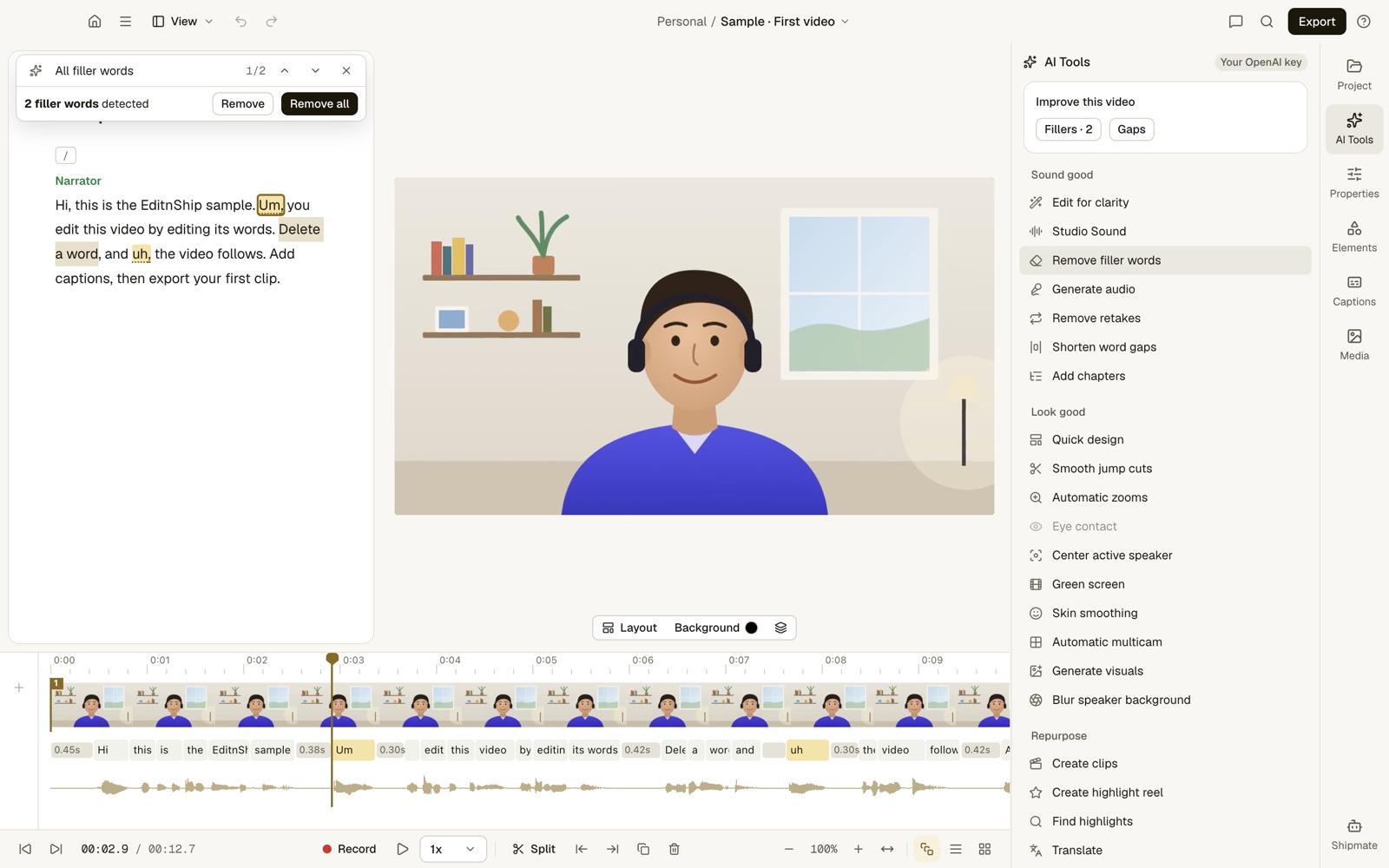
What to notice: 2 fillers found. Remove all deletes both, on your Mac, with no AI account and no credits.
Sound cleanup uses Apple's voice isolation on your Mac, with Low, Medium and High strength. The app's panel is also called Studio Sound, but it isn't Descript's tool.
Descript's Studio Sound needs internet and costs credits.
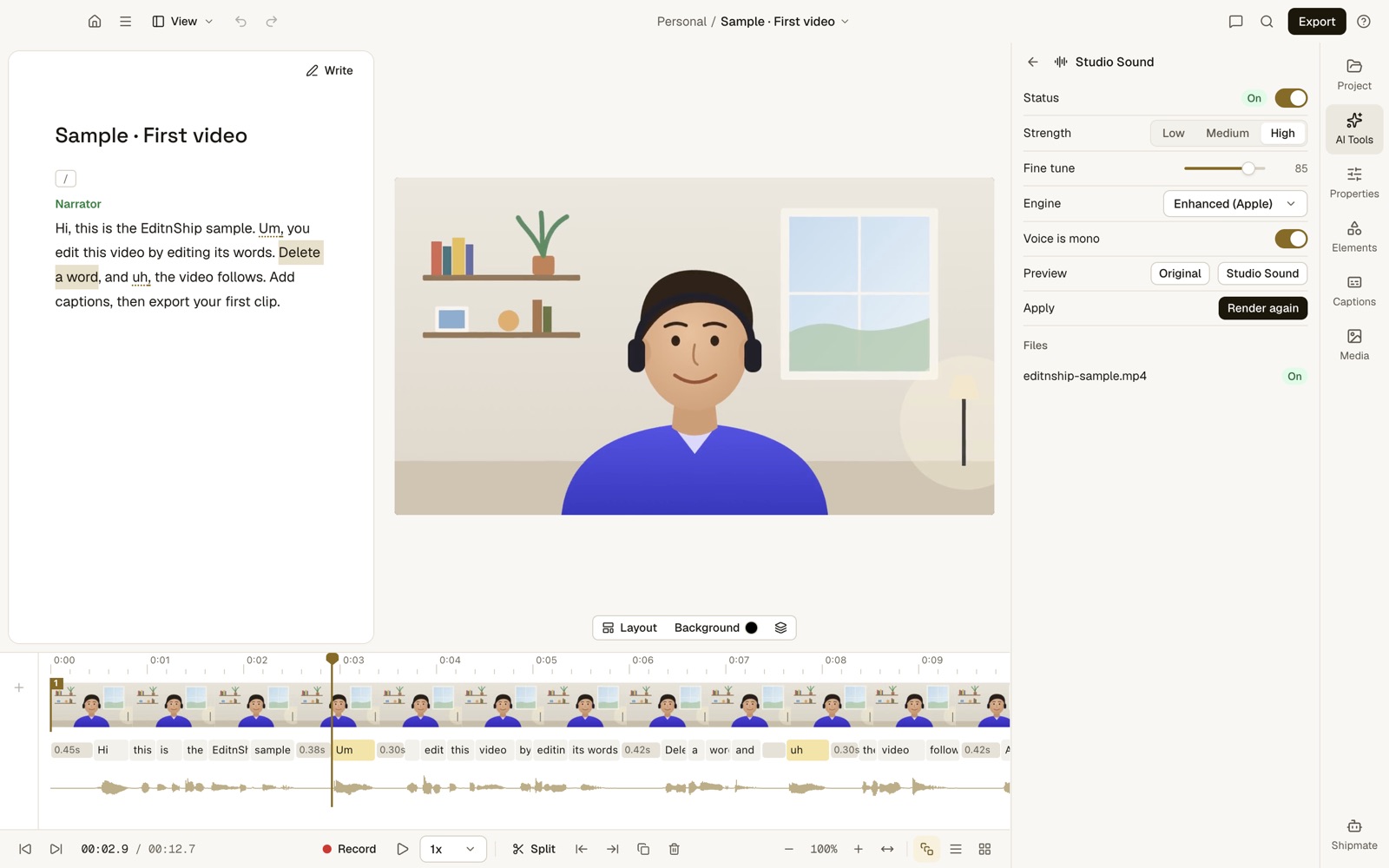
What to notice: you can switch between the original and the cleaned-up sound before you keep it.
To be fair, I haven't run a listening test against Descript yet. So EditnShip wins here on cost, not on proven sound quality.
There's also Shorten pauses, which trims long gaps between words. See the clean-up tools.
Transcription: EditnShip for offline, Descript for convenience
Descript's help center says transcription starts after your file uploads to the cloud. That's easy, but you need internet.
EditnShip can transcribe on your Mac. You download the speech model once, about 1.6 GB, and pick On device. After that, your video never leaves your Mac to be transcribed.
The language list is different too. Descript lists 25 languages on its pricing page, and it doesn't support Chinese, Japanese or Russian. EditnShip's on-device model is Whisper Large v3 Turbo, which is built for many languages, including those three.
The AI helper: Shipmate vs Underlord
Both apps have an AI helper you type to.
Descript's is Underlord. It makes captions, clips, vertical videos, animations, translations and music. It's in beta, and every message uses credits.
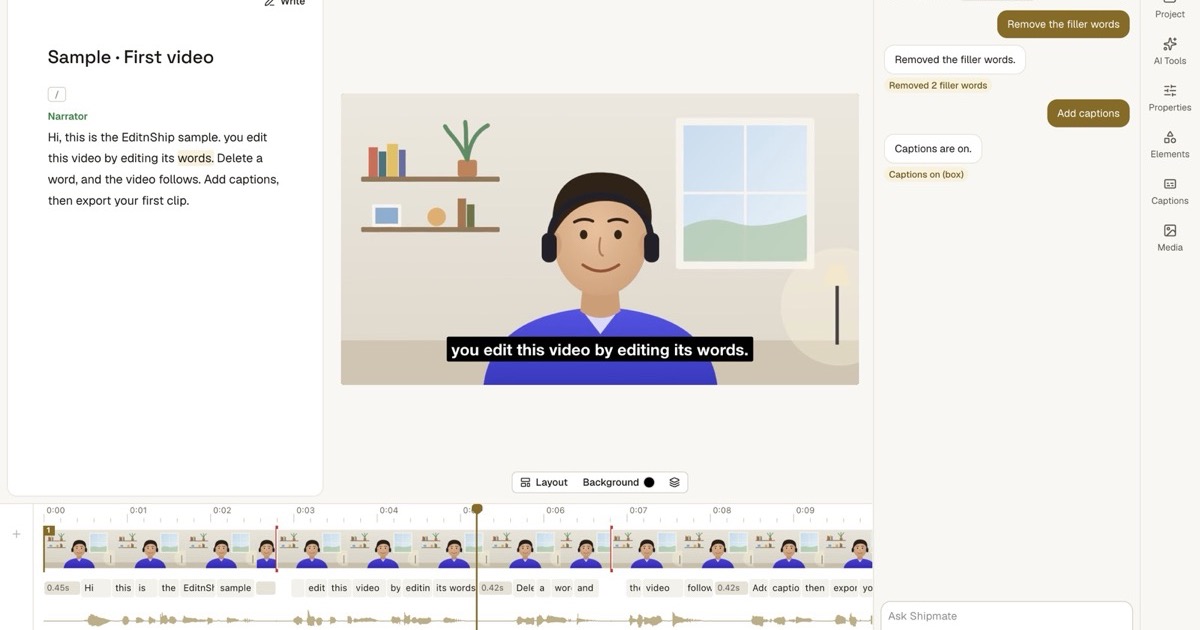
EditnShip's is Shipmate. You type what you want, like "remove the filler words," and it makes the edit. Each edit is one undo step.
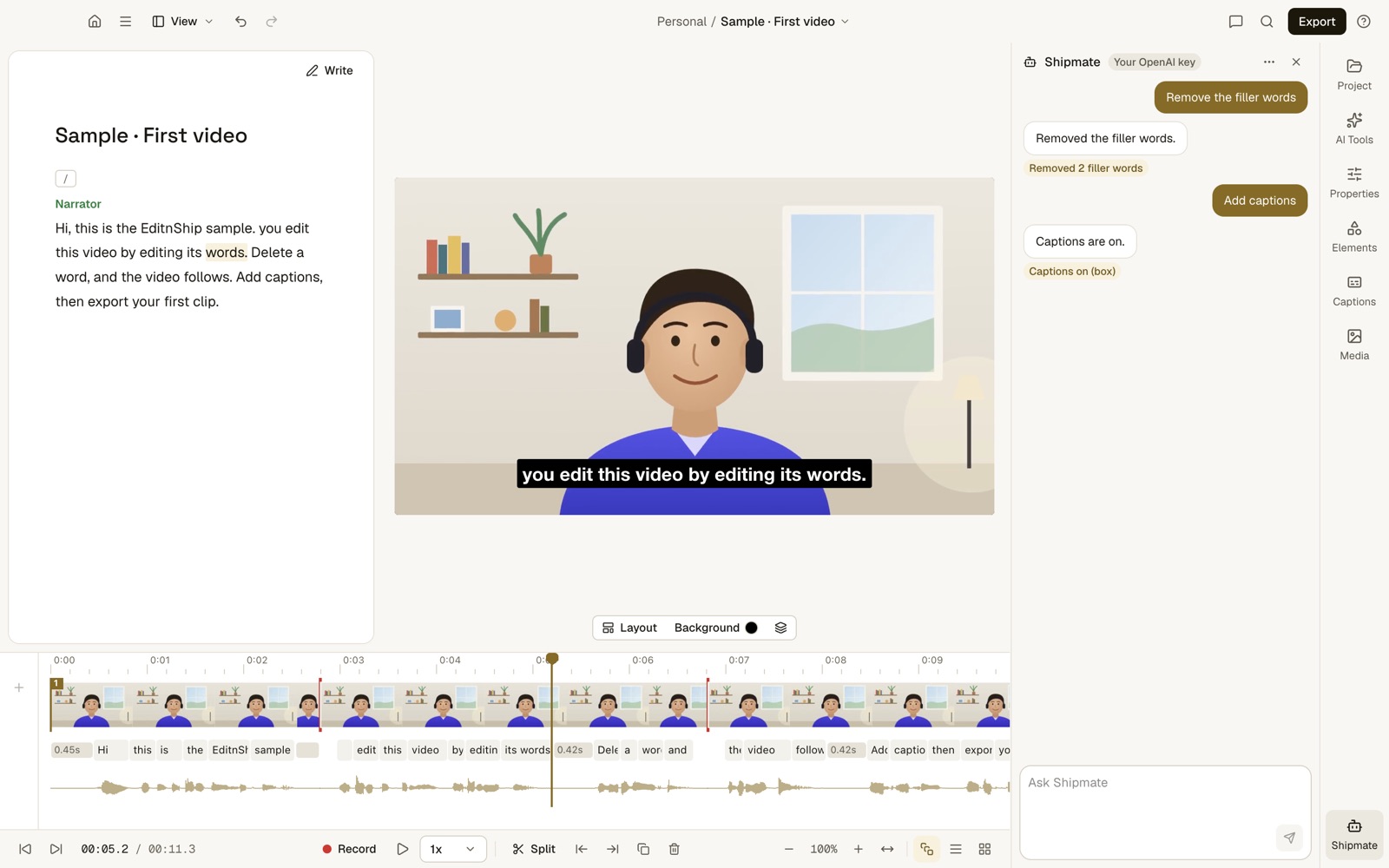
What to notice: two requests, two edits, and Shipmate says exactly what it changed. This capture used an OpenAI account. On a plan, Shipmate spends your credits instead.
I wanted to know how well Shipmate really edits. So on November 10, 2026, I ran my own test.
I gave Shipmate's tools 100 everyday requests, like "cut the intro" or "make the captions bigger."
Ten were traps it should refuse, such as faking a celebrity video.
Claude Opus 5.5 passed all 100. To be fair, plans run a smaller, cheaper Claude model. I haven't put that one through the same 100 yet.
Even better, you can skip Shipmate. Already pay for Claude? Connect the Claude app to EditnShip on your Mac. Then Claude edits on your own Claude plan, and you choose what it may do in Settings. See how it works.
Captions and clips: Descript wins, by a little
Both make captions from your transcript, so your text edits carry over.
Descript's caption styles go deeper, with gradients and more control over the word being spoken. EditnShip has 8 caption styles, with font, size, outline and shadow settings and a live preview.
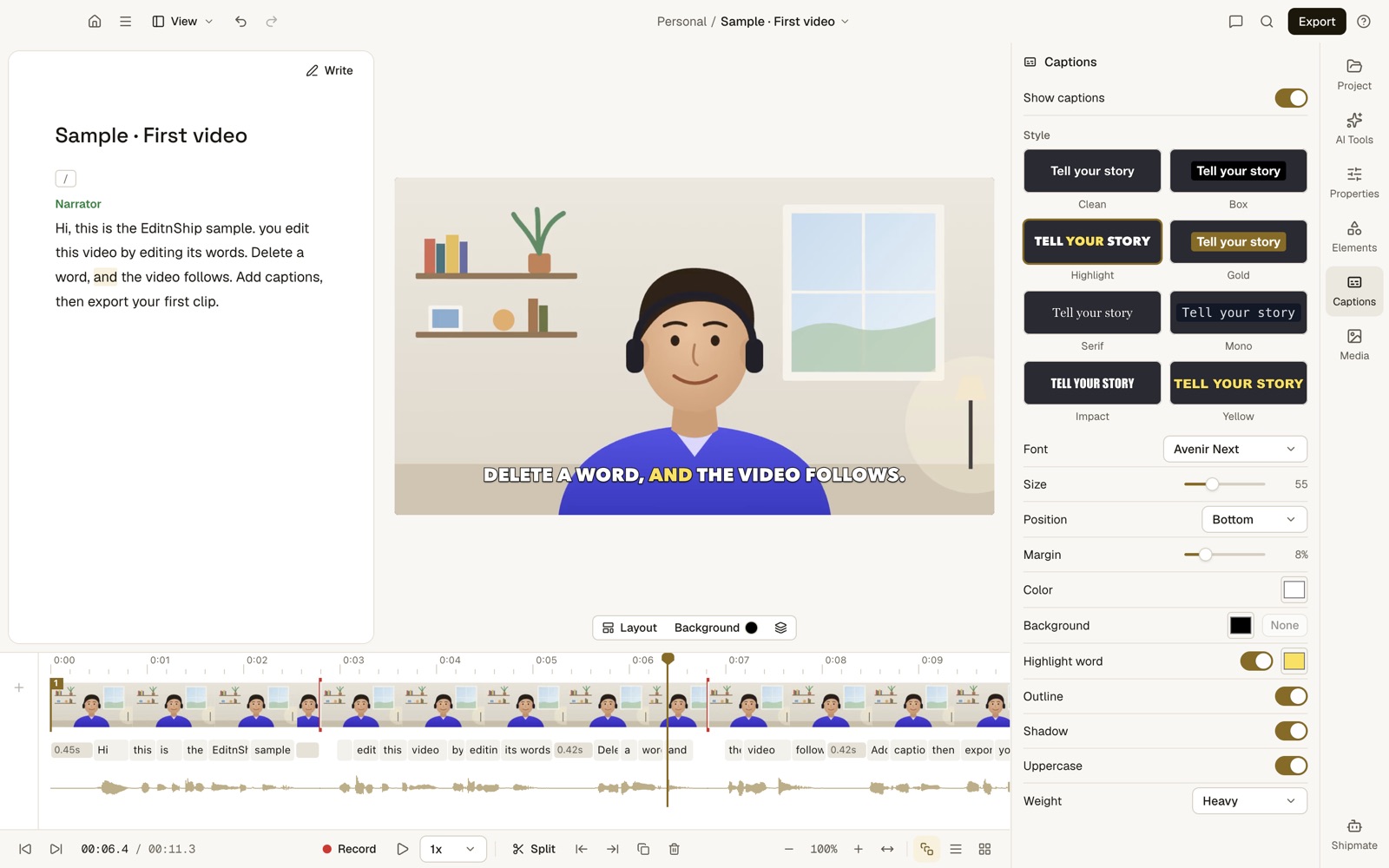
What to notice: the word being spoken lights up as the video plays. You can burn captions into the video, or save a caption file for YouTube.
For clips, both find the best moments in a long video and make vertical versions. Descript makes 1 to 20 clips, from 10 seconds to 5 minutes. EditnShip resizes its highlights for TikTok, Reels or Instagram, and exports them all at once.
EditnShip also has scene layouts, text and shape layers, a brand kit and a Studio frame.
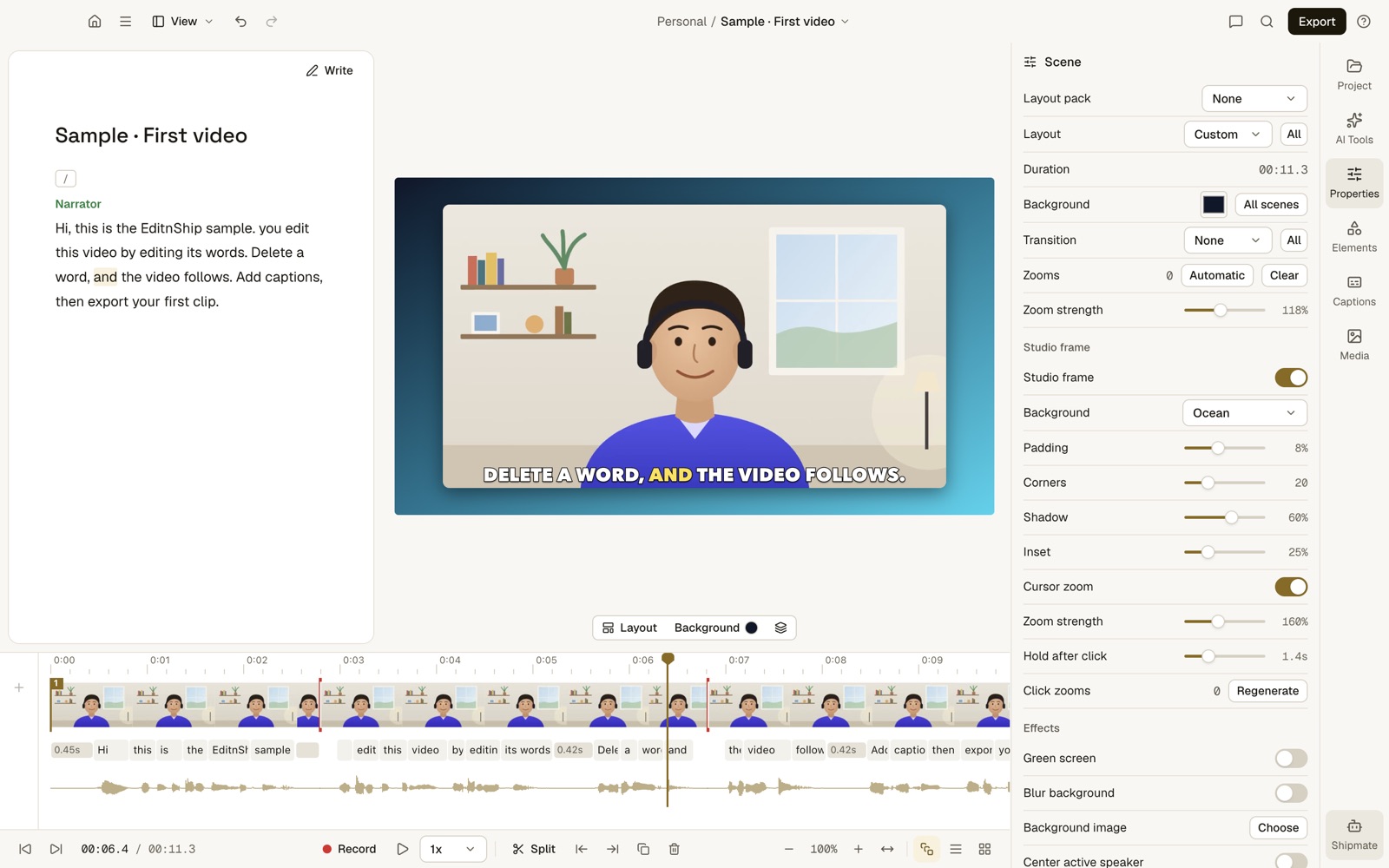
What to notice: the Studio frame puts your video on a background with rounded corners, in one click.
Recording: Descript for interviews, close for solo videos
Descript's Rooms records up to 10 people remotely, and Hobbyist includes 5 recording hours a month. EditnShip has nothing like it.
For recording yourself, they're close. Descript's screen recorder runs from the menu bar for up to 4 hours. EditnShip has five modes: Camera, Screen, Screen + Camera, Audio only and Studio Record.
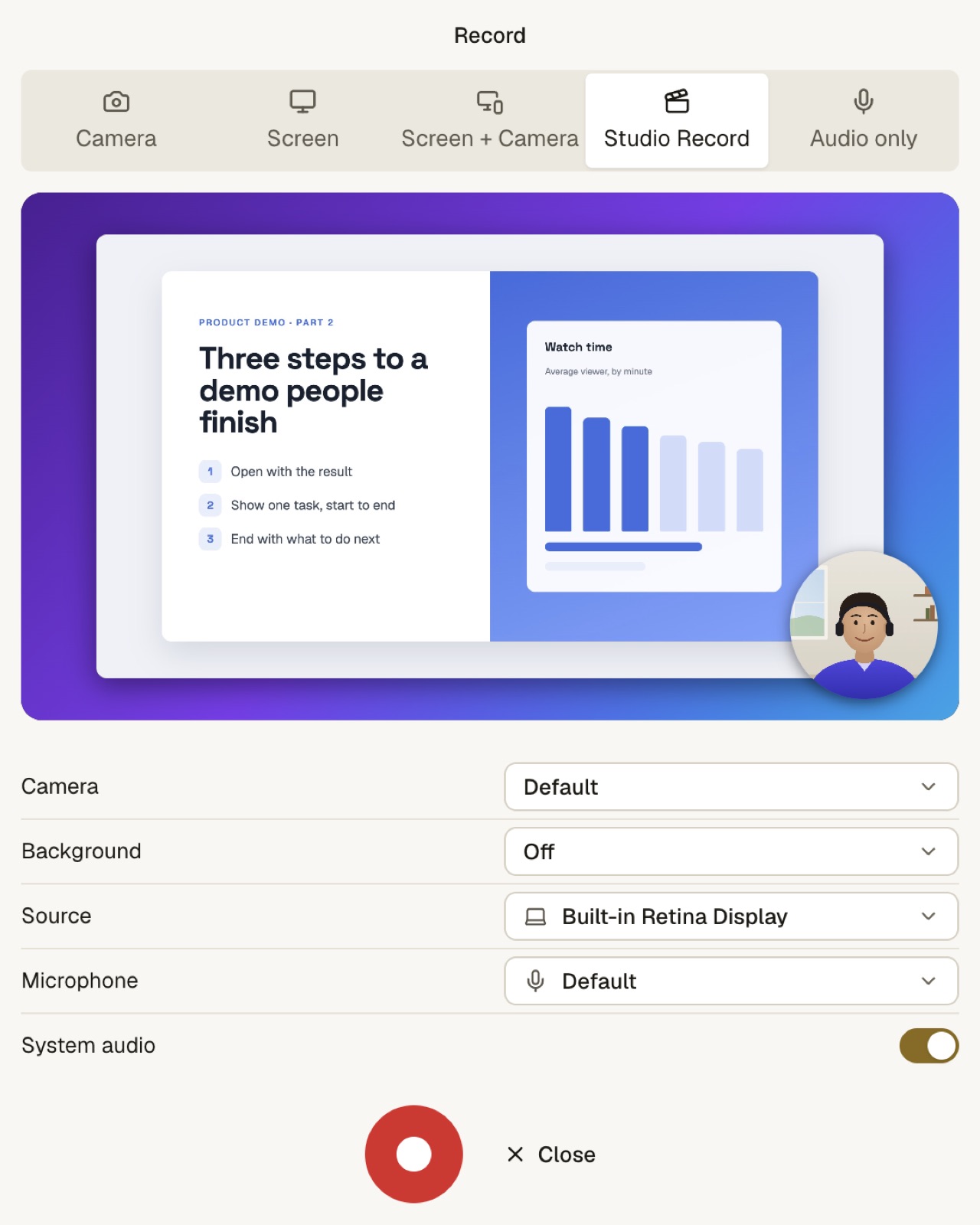
What to notice: every recording mode is one click away, with a live preview. Screen recording needs macOS 15.
Studio Record captures your screen, your camera and your clicks together. Then it zooms in where you click.
Export and YouTube: EditnShip wins on 4K
EditnShip exports 4K on every option, even the $29 app. Descript's Hobbyist plan stops at 1080p, so 4K means Creator or higher.
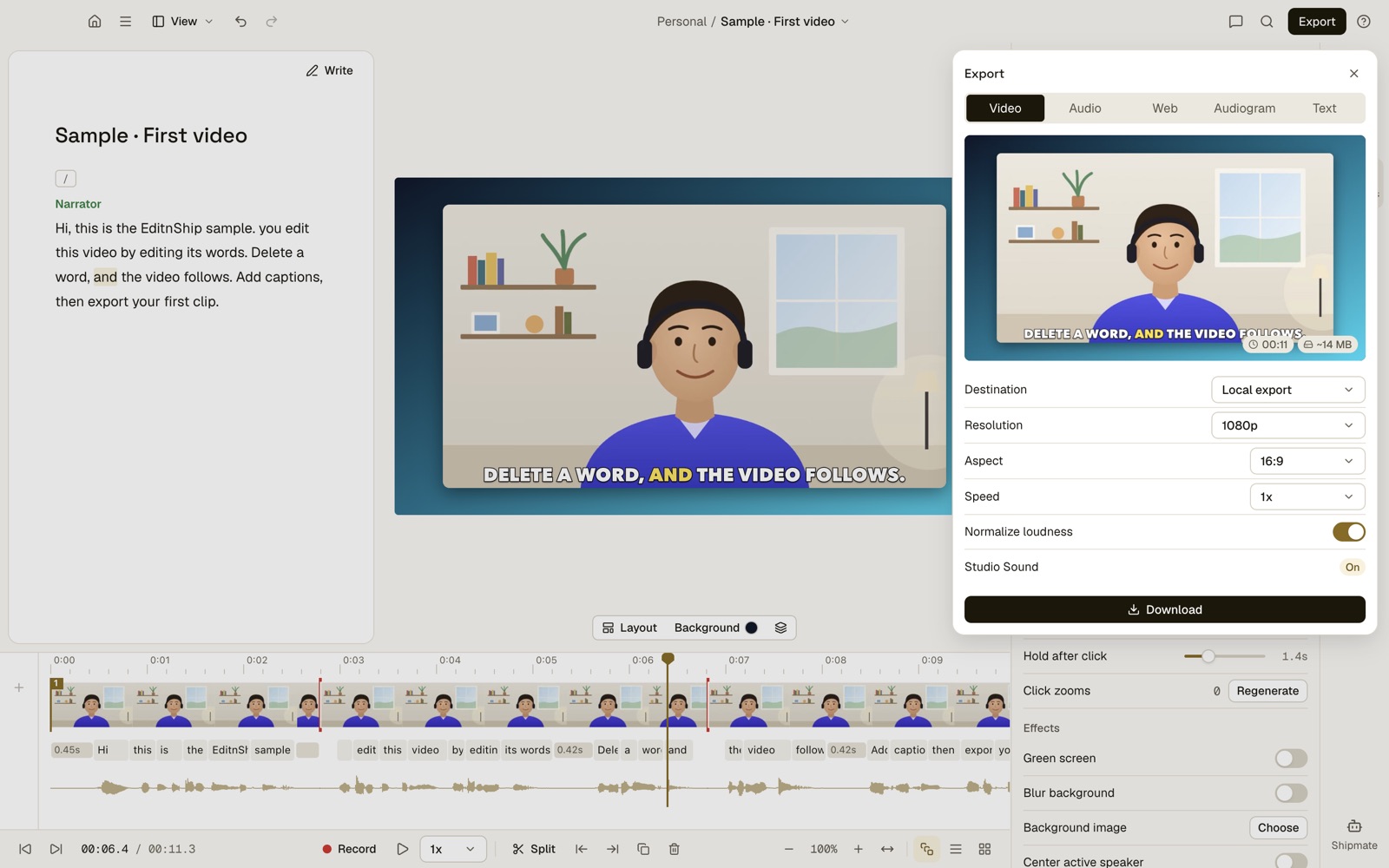
What to notice: this export is set to 1080p, but the same list goes up to 4K on every option.
Both post to YouTube. Descript does it from its web app. EditnShip does it from the Mac app, and drafts the title, description, chapters and thumbnail from your transcript.
Auto Post: only in EditnShip
Descript doesn't list anything like this on its pricing page. You set up a series once. EditnShip writes the scripts, adds a voice and stock footage, and builds short videos. You review them, and the ones you approve post on your calendar.
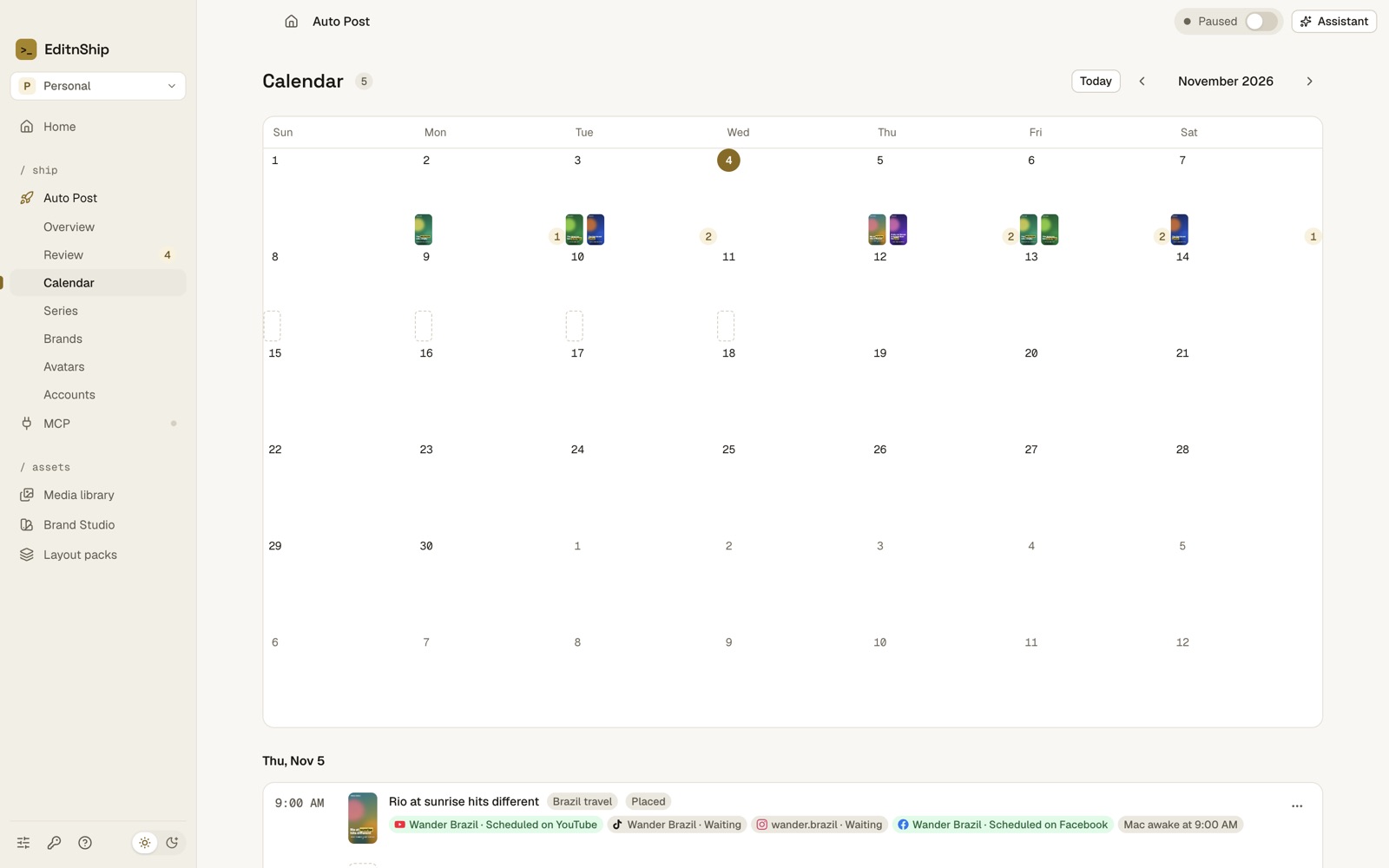
What to notice: every video waits for your approval before it goes on the calendar.
Three honest limits. Auto Post uses your own AI and stock footage accounts, which you pay for. YouTube connects with one sign-in, while Instagram, Facebook and TikTok need extra setup today. And some accounts post from your Mac, so it needs to be awake at posting time. See Auto Post.
When Descript Is the Better Pick
Here's the deal: Descript is the better tool in a few clear cases. I'd rather you know them now than after you buy.
- You use Windows. Descript has a Windows app. EditnShip's app is for Macs with an M1 chip or newer.
- You edit with a team. Descript has shared drives, and live cursors on Business. EditnShip is for one person.
- You interview people remotely. Rooms records up to 10 people. EditnShip can't.
- You want Eye Contact. Descript can make you look at the camera. EditnShip can't. You'll see Eye contact greyed out in its AI tools list, because it doesn't work yet.
- You have no green screen. Descript's Green Screen removes your background with AI. EditnShip can blur it, or key out a real green screen.
- You want a voice of you, built in. Descript makes one inside the app. EditnShip re-records a line with a stock voice, or a voice from your own ElevenLabs account.
- You need many languages. Descript translates captions into 61 languages and dubs into 30. EditnShip translates into 15.
- You want AI avatars or AI video built in. Descript has an avatar gallery and makes video from a prompt.
- You want to try it for free. Descript has a free plan. EditnShip has a refund window and a trial instead.
If two or more of these sound like you, Descript is probably the better pick.
When EditnShip Is the Better Pick
EditnShip is the better pick when:
- You run out of Descript credits. Filler removal and sound cleanup never use credits in EditnShip.
- You make a lot of videos. The Mac app has no media hours to run out of.
- You'd rather pay once. The Mac app is $29, with updates.
- You want 4K without an upgrade. Every option exports 4K.
- You work offline, or care about privacy. Transcription and clean-up can run on your Mac, with no upload.
- You speak Spanish, French, German or Portuguese. Filler removal works in all of them.
- You want short videos on a schedule. Auto Post builds and posts them after you approve.
Staying With Descript? How to Spend Fewer Credits
Not ready to switch? These 3 habits stretch your Descript credits further:
- Cut first, clean up last. Descript charges each time you run a tool on a file. So run Studio Sound and filler removal once, on your final cut.
- Pay yearly if you're staying. Yearly billing cuts Hobbyist from $288 to $192 a year. That's a third off.
- Test on the free plan first. It gives you 1 media hour a month and 100 credits, once.
How to Switch From Descript to EditnShip
Step #1: Check your Mac. Open the Apple menu and choose About This Mac. You need an M1 chip or newer and macOS 14 or later. Screen recording needs macOS 15.
Step #2: Export your videos from Descript. EditnShip can't open Descript project files. So export each video you still need as an MP4.
Step #3: Import them into EditnShip. Drop the files on the Home screen. Each one gets a fresh transcript, on your Mac if you choose On device.
Step #4: Cancel Descript at the end of your billing period. Do it after your videos are safe.
Pros and Cons
EditnShip
- $29 once for the Mac app
- No media hours in the Mac app
- Filler removal and sound cleanup use no credits
- Transcribes on your Mac, even offline
- 4K on every option
- Auto Post for scheduled short videos
- Mac only, M1 or newer
- No free plan
- No remote guest recording
- No Eye Contact or AI background removal
- For one person, not teams
Descript
- Runs on Mac, Windows and in a browser
- A free plan to try it
- Rooms records up to 10 people
- Eye Contact and AI background removal
- Team editing with shared drives
- Media capped at 10, 30 or 40 hours a month
- Studio Sound and filler removal use credits
- 4K needs Creator or higher
- Transcription needs an upload
- You pay every month or every year
The Verdict
Pick EditnShip if you edit alone on a Mac and you're tired of running out of credits. The $29 Mac app does the everyday jobs, and its clean-up tools never use credits.
Add a monthly plan only if you want Shipmate's AI credits included, without an AI account of your own.
Pick Descript if you use Windows, interview people remotely or edit with a team.
My advice: list the three features you use every week. If they're all in EditnShip, try the $29 Mac app. You have 14 days to get your money back.
Frequently Asked Questions
Is EditnShip better than Descript?
For one person editing talking videos on a Mac, yes. It costs less, and filler removal and sound cleanup never use credits. Descript is better for teams, remote interviews, Windows and Eye Contact.
Is EditnShip cheaper than Descript?
Yes, for the Mac app, which is $29 once. Descript's paid plans cost $16 to $50 a month billed yearly, or $24 to $65 month to month.
Why do my Descript credits run out so fast?
Studio Sound and filler removal each cost up to 30 credits per file, and every Underlord message uses credits too. By my math, Hobbyist's 400 credits clean up as few as 6 long videos a month.
What happens when my Descript credits run out?
Unused credits don't roll over, and the AI tools need credits to run. On Creator and Business, you can buy more, from $35 for 350. On Hobbyist, you wait for next month or upgrade.
Is Descript worth it in 2026?
Yes, if you edit with a team, record remote guests or use Windows. If you edit alone on a Mac and keep running out of credits, a one-time app like EditnShip costs less.
Will EditnShip run on my Mac?
It needs a Mac with an M1 chip or newer and macOS 14 or later. To check, open the Apple menu and choose About This Mac. Intel Macs can't run it.
Does EditnShip have a free plan?
No. The Mac app comes with a full refund within 14 days. Each plan's first week is $1, with 10 credits.
Does EditnShip work on Windows?
No. There is no Windows app. The Mac app needs Apple's own chips, M1 or newer.
Does Descript work offline?
Not for transcription or Studio Sound. Descript uploads files to transcribe them, and Studio Sound needs internet. EditnShip can do both offline once its models are downloaded.
Can EditnShip remove filler words like Descript?
Yes. It removes ums, uhs and stutters in one step, on your Mac, with no credits. It works in English, Spanish, French, German and Portuguese.
Can I open Descript projects in EditnShip?
No. Export your videos from Descript as MP4 files, then import them into EditnShip.
Now I'd like to hear from you: which Descript feature would you miss most if you switched? Email me, and I'll answer every one.
About the author
RH Fardin
I'm an SEO and growth marketer and web developer, and I build and market EditnShip myself. I've spent 5+ years on 120+ projects for 50+ clients.
Sources
- Descript pricing, read November 12, 2026
- Descript: media minutes and AI credits and top-ups
- Descript system requirements and install
- Descript transcription and languages
- Descript Underlord
- Studio Sound, filler words, Eye Contact and Green Screen
- Descript custom voices
- Descript screen recorder
- Descript clips, captions and YouTube publishing
- Descript cursor presence
- EditnShip pricing, refunds and terms
Checked on November 12, 2026. Prices change often, so check before you buy. All product names are trademarks of their owners, shown here to identify their products. EditnShip isn't affiliated with Descript.
Related: 10 best Descript alternatives · Descript vs Camtasia