How to Cancel Your Descript Subscription (Step by Step, 2026)
 RH FardinMaker of EditnShip · Updated November 14, 2026

Another Descript charge just hit your card. Here's the catch: there's no button called "Cancel."
Here's how to cancel your Descript subscription anyway, checked against Descript's own help center on November 12, 2026.
Full disclosure: I built EditnShip, a Mac video editor, after my Descript credits ran out. This guide works even if you never try it.
Let's get started.
after Descript charges you to ask for that plan payment back
the most the Descript Free plan exports once your paid plan ends
per Drive, so canceling one Drive doesn't cancel the others
How to Cancel Your Descript Subscription in 7 Steps
Descript treats canceling as a downgrade. You move your plan down to Free, and the paid plan stops renewing.
You can do it on the web or in the desktop app. The steps are the same.
Step #1: Sign in to Descript
Go to web.descript.com, or open the Descript app on your computer.
Sign in with the email that owns the plan. Descript only takes cancel requests from the Drive owner's email.
Step #2: Open App Settings
On a Mac, hold the Command key and press the comma key. On a PC, use Control and comma.
Or click your Drive name at the top left and choose Settings.
Step #3: Pick the right Drive
A Drive is a Descript workspace. It has nothing to do with Google Drive.
Each Drive has its own plan, its own bill and its own card. If you own more than one, use the Drive picker in the sidebar. Choose the Drive you want to cancel.
Step #4: Go to the Plan tab and click Change plan
You'll see two buttons with similar names. Only one of them cancels.
| Button | What it does | Use it to cancel? |
|---|---|---|
| Change plan | Opens the plan list, including Downgrade to Free | Yes |
| Edit current plan | Changes seats and transcription hours only | No |
Button names from Descript's cancel article, checked on November 12, 2026.
Step #5: Choose Downgrade to Free
You'll see Descript's plan list. To cancel, pick Downgrade to Free.
Only want to pay less? Pick a cheaper plan here instead. Hobbyist is $24 a month, or $16 a month billed yearly (checked on November 12, 2026). That change also starts when your billing cycle ends. See every Descript plan.
Paying yearly? Moving to monthly billing is another option. Descript says that change also starts when your current cycle ends.
Step #6: Pick a reason and click Cancel subscription
The reason is required. Pick the closest one, then click Cancel subscription.
Descript's cancel article mentions no discount offer on the way out. If you do see one, you can skip it and keep going.
Step #7: Wait for the confirmation message
Follow the prompts until you see Descript's cancellation confirmation message. Don't close the window before that.
My tip: take a screenshot of that message. It's your own proof of the date you canceled.
Want to double-check? Reopen the Plan tab. You should now see an option to cancel the pending change. That means your downgrade is booked.
Changed your mind?
Before the cycle ends, go back to App Settings, pick the same Drive and open the Plan tab. Choose the option to cancel the pending change. Your plan keeps renewing as before.
What Happens After You Cancel Descript
Nothing changes right away. Your paid plan stays active until the end of the billing cycle, meaning the month or year you already paid for.
Then your Drive moves to the Free plan (what the Free plan includes). Here's what that means:
| Item | Until the cycle ends | After it ends (Free plan) |
|---|---|---|
| Your projects | Full access | Still open, but paid features stop working |
| Media you can add | Your plan's hours | 1 media hour a month |
| AI credits | What's left this month | 100 credits, once |
| Video export | Your plan's quality | Up to 720p, with a watermark |
| Top-up credits you bought | Usable | Kept, but you can't use them on Free |
| Coming back | Cancel the pending change | Upgrade anytime |
From Descript's cancel article and pricing page, checked on November 12, 2026.
So your old projects stay. But any video you export from them on Free comes out at 720p with Descript's watermark. That's why the next section matters.
Two more things to know.
First, top-up credits are extra credits you bought on top of your plan. They still expire 12 months after you bought them. Second, unused monthly credits and media hours never roll over (how Descript credits work).
And a note on legacy plans. Those are Descript's older plans. Descript started moving people off them on November 17, 2025. If your Plan tab still shows one, leaving it is final. You can't go back to it later.
What to Export Before Your Descript Plan Ends
Here's the deal: cancel today, then use the rest of your cycle to save your work.
You lose 1080p and 4K exports when the Free plan starts. So do these 5 things, in this order:
- Spend your credits first. They don't roll over. Run Studio Sound and filler removal on your final cuts. Then export, so you don't have to export twice.
- Export your finished videos. Click Export, pick the Video tab, then Local export. That saves an MP4 file to your computer.
- Export your transcripts. The Transcript tab saves them as .docx, .txt, .rtf, .md or .html files.
- Export your captions. Descript can save subtitles as SRT or VTT files, which most video apps can open.
- Download your invoices. Open App Settings, then the Invoices tab, then View Receipt.
Moving to Premiere Pro, Final Cut Pro or DaVinci Resolve? Descript's timeline export sends your cuts to those apps as an editable project. But it only works on Creator, Business and Enterprise plans.
On Hobbyist, export plain MP4 files instead.
Can You Get Your Last Descript Payment Back? The 48-Hour Rule
Usually not. Canceling stops the next charge. It doesn't return the last one.
But there's one window most guides skip.
Descript's policy page says it pays back a plan charge if you ask within 48 hours of the invoice date. That's the day Descript charged you. Here's the full rule, checked on November 12, 2026:
| Charge | Can you get it back? |
|---|---|
| Plan (monthly or yearly) | Yes, if you ask within 48 hours of the invoice date |
| Extra editor seat | Yes, within 7 days. The Drive owner asks |
| Top-up credits or media hours | No, never |
| Unused days after you cancel | No. Descript doesn't prorate, meaning it won't pay back part of a month |
Live in the EU or the UK? Descript's policy page doesn't mention any extra rights there. Ask support whether your local law gives you more time.
How to ask Descript for your payment back
Use Descript's support request form. Send it from the email on your account.
On a paid plan, you can also use live chat at web.descript.com/chat. Descript says people answer it Monday to Friday, 5 a.m. to 5 p.m. Pacific Time.
Find your invoice date first, in App Settings under Invoices. Then keep the message short. For example:
Sample message
"Hi, I canceled my plan on the Drive named [Drive name] today. I was charged on [invoice date]. That's within 48 hours, so I'd like that plan payment back, please. Thanks, [your name]."
Already sent a request? Reply to that same thread instead of starting a new one.
The bottom line? If Descript just renewed, cancel and ask today. After 48 hours, it's too late.
Still Charged After Canceling Descript? 8 Things to Check
Most surprise charges after canceling come from one of these:
- You canceled one Drive, not all of them. Each Drive bills on its own. A second Drive can keep charging an older card.
- You have a second account. Descript says some people signed up twice with different emails. Sign in with each one and check the Plan tab.
- You pay for SquadCast on its own. SquadCast is a remote recording service that works with Descript. If you bought it directly, cancel it at app.squadcast.fm, under your subscription page.
- You waited for the renewal day. Descript charges at the start of each cycle. Make the change before your renewal date. Descript says to check the Invoices tab in App Settings to see that day.
- Your last payment failed. Descript blocks plan changes on past-due accounts. Fix the payment or contact support first.
- You clicked Edit current plan. That only changes seats and hours. Go back and click Change plan.
- You added seats or transcription hours. Those raise your bill. They show as extra lines on the same invoice.
- Your bank shows a different amount. If you pay in a currency other than US dollars, your bank shows the local amount.
Leaving a company Drive? Only the owner's email can cancel it. If that person left, Descript suggests working with your IT team to get the email back.
Cancel vs Delete Your Account: Don't Mix Them Up
Canceling keeps your account and your projects. Deleting removes everything, for good.
Descript's delete-account page lists what goes: all projects and media, all Drives you own, all transcripts, and your invoices. Any active plan ends at once, and you lose the unused time.
Some guides say deleting doesn't stop billing. Descript's own page says it does.
Deleting doesn't pay anything back either. If you're inside the 48-hour window, contact support before you delete.
So do it in this order:
- Cancel the plan on every Drive.
- Export your videos, transcripts, captions and invoices.
- On a team? Remove the other members from your Drive first.
- Delete the account only if you want your data gone. Click your profile picture, then Settings, then the Profile tab, then Delete account.
What to Use Instead of Descript on a Mac
Maybe you're leaving over cost, not over editing by text. That was me.
On Descript's basic plan, I paid about $25 a month. After two or three videos, my AI credits were gone. I couldn't clean up my voice.
So I built EditnShip. It's a Mac app for talking videos. You edit the video by editing its transcript, just like in Descript.
Here's what changed for me. The tools that used up my Descript credits run on my Mac in EditnShip, with no credits:
- Filler word removal in English, Spanish, French, German and Portuguese.
- Sound cleanup with Apple's voice isolation, at Low, Medium or High strength.
- Transcription with a speech model you download once, about 1.6 GB. After that, your video never leaves your Mac.
- Export up to 4K, even on the $29 app.
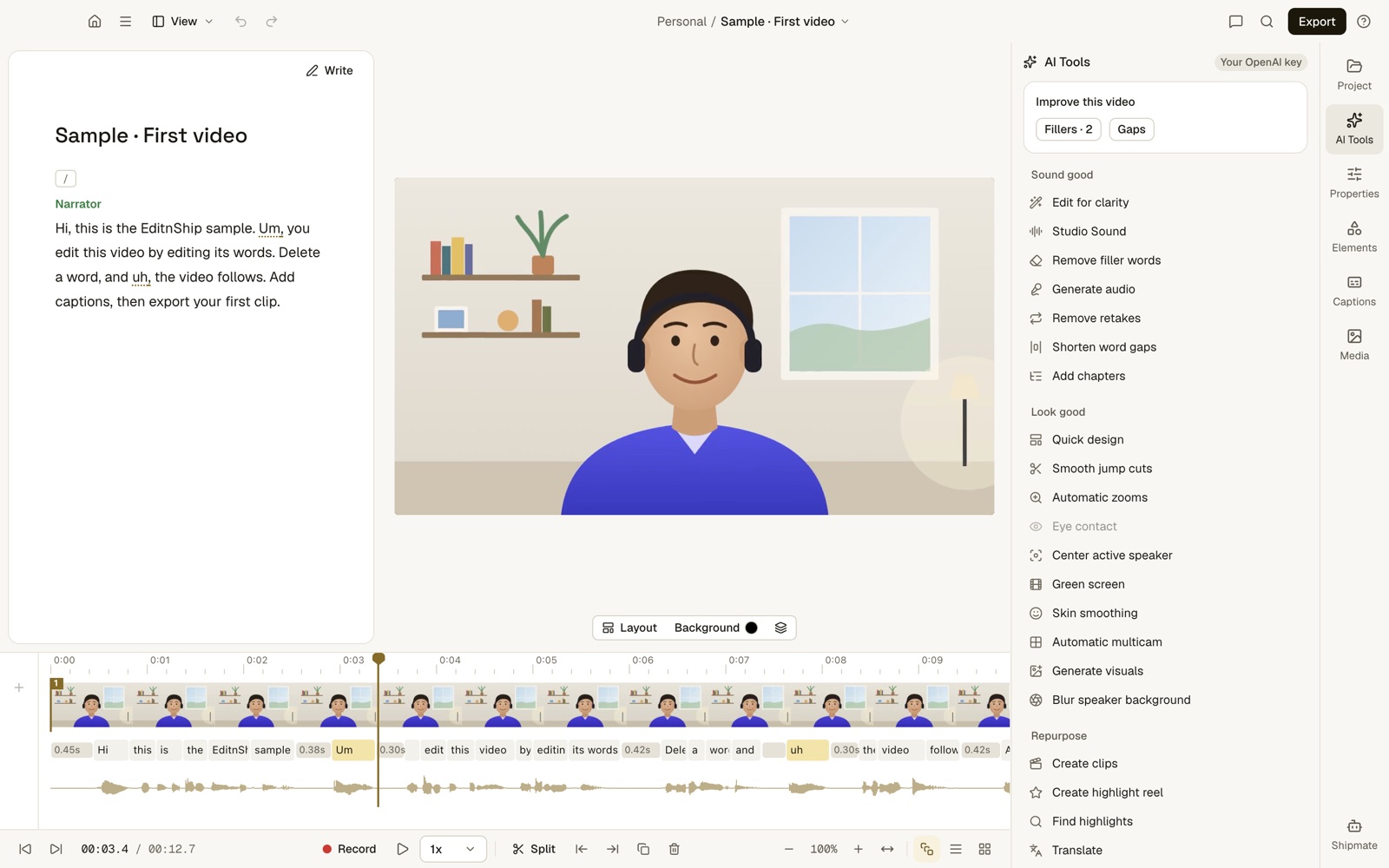
What to notice: each word in the transcript sits under its frames on the timeline. Delete the word, and those frames go too.
How to move your videos from Descript
Step #1: Check your Mac. Open the Apple menu, then About This Mac. You need an M1 chip or newer and macOS 14 or later.
Step #2: Export MP4s before your plan ends. EditnShip can't open Descript project files.
Step #3: Drop the MP4s on EditnShip's Home screen. It writes a new transcript for each one. Then cut words and click Export.
What it costs
The EditnShip Mac app is $29 once, with updates. Some AI features, like Shipmate, the AI helper you type to, need your own AI key (for example, from OpenAI). You can also edit with no AI at all.
There are also monthly plans with AI credits, sold separately, for people who'd rather not set up a key. 100 credits cover 100+ edits. See the pricing page.
When Descript is still the better pick
I'd rather tell you now. Stay with Descript, or pick another tool, if any of these fit:
- You don't use a Mac. EditnShip runs only on Macs with an M1 chip or newer.
- You edit with a team. EditnShip is built for one person.
- You record remote guests. Descript's Rooms records up to 10 people. EditnShip can't.
- You need Eye Contact or an AI tool that cuts you out of any background. EditnShip has neither. Its Green screen tool only works if you film in front of a real green cloth. It can also blur your background.
Still comparing? Read EditnShip vs Descript, see every Descript plan and credit limit, or browse the 10 best Descript alternatives.
Frequently Asked Questions
How do I cancel my Descript subscription?
Open App Settings by pressing Command and comma, pick your Drive and go to the Plan tab. Click Change plan, choose Downgrade to Free, pick a reason and click Cancel subscription. Repeat for every Drive you own.
When does my Descript plan end after I cancel?
At the end of the billing cycle you already paid for. Until then, you keep every paid feature. After that, your Drive moves to the Free plan.
Can I cancel a Descript annual plan?
Yes, with the same steps. Your plan runs to the end of the year you paid for. Descript doesn't prorate, so it only pays back a yearly charge if you ask within 48 hours of that invoice.
Can I get my last payment back if I cancel Descript?
Only for a plan charge, and only if you ask support within 48 hours of the invoice date. Use the support request form at descript.zendesk.com from your account email. Extra editor seats have 7 days, top-ups are never paid back, and unused days aren't prorated.
Does Descript have a free trial I need to cancel?
On November 12, 2026, Descript's pricing page listed a Free plan at $0 and no timed trial of a paid plan. If you never moved to a paid plan, there's nothing to cancel. The Free plan gives 1 media hour a month and 720p exports with a watermark.
Why am I still being charged after canceling Descript?
Most often, you own a second Drive, a second account or a separate SquadCast plan. Each Drive bills on its own card. Check the Plan tab for every Drive and every email you signed up with.
Does deleting my Descript account cancel my subscription?
Yes, but it also deletes all your projects, media and invoices at once. You lose the unused time and get nothing paid back. Cancel the plan and export your files first.
Can I pause my Descript subscription instead?
Descript's invoice help page mentions paused plans. But on November 12, 2026, its pause article sent me to the cancel page, and I found no pause steps. Ask Descript support if a pause is still offered.
Can I undo my Descript cancellation?
Yes, before the billing cycle ends. Open App Settings, pick the same Drive and choose the option to cancel the pending change in the Plan tab. After the cycle ends, you can upgrade again anytime.
What's a cheaper Descript alternative for Mac?
EditnShip is a Mac video editor that edits video by editing text. The Mac app is $29 once, and there are also monthly plans with AI credits. Filler removal, sound cleanup and on-device transcription use no credits, on Macs with an M1 chip or newer.
Now I'd like to hear from you: what finally made you cancel Descript? Email me, and I'll answer every one.
About the author
RH Fardin
I paid for Descript's basic plan myself before I built EditnShip, a Mac video editor. I'm also an SEO and growth marketer and web developer with 5+ years on 120+ projects for 50+ clients.
Sources
- Descript: downgrade or cancel a subscription, read November 12, 2026
- Descript: policy on paying back plans, seats and top-ups, and switching billing cycles, checked on November 12, 2026
- Descript: contact the support team and support request form, read November 12, 2026
- Descript: why has my account been charged?, read November 12, 2026, and how billing works, checked on November 12, 2026
- Descript: manage your Drive subscription and invoice history, checked on November 12, 2026
- Descript: media minutes and AI credits and top-ups
- Descript: legacy and sunset plans, read November 12, 2026
- Descript: delete your account, read November 12, 2026
- Descript: cancel a SquadCast subscription, read November 12, 2026
- Descript: export a video, transcript, subtitles and timeline
- Descript pricing, read November 12, 2026
- EditnShip pricing and terms
Checked on November 12, 2026. Descript changes its menus and plans often, so check its help center before you act. All product names are trademarks of their owners, shown here to identify their products. EditnShip isn't affiliated with Descript.
Related: EditnShip vs Descript · Descript pricing · 10 best Descript alternatives · Mac video editors you pay for once