Descript Pricing 2026: Every Plan, Credit Limit and Real Yearly Cost
 RH FardinMaker of EditnShip · Updated November 13, 2026
Descript costs $0 to $65 a month per person. Its pricing page shows four plans, two prices for each, and two kinds of limits.
So what will you really pay?
This guide breaks down Descript pricing plan by plan. You'll see each price, what the credits cover, and the real cost over one and three years. Every number was checked on Descript's own pages on November 12, 2026.
One thing first: I paid about $25 a month for Descript's basic plan. After two or three videos, my AI credits were gone. So I built EditnShip, a Mac editor. I'll still tell you when Descript is the better buy.
Let's dive in.
Descript Pricing: Key Takeaways
- Descript's cheapest paid plan costs $192 a year billed yearly, or $288 if you pay month to month.
- Paying yearly saves 23% to 33%, depending on the plan. Descript's toggle says "up to 35%", but its own prices work out to 33% at most.
- By my math, Hobbyist's 400 credits clean up as few as 6 long videos a month. Unused credits don't roll over.
- Extra credits start at $35 for 350, and only Creator and Business can buy them.
Descript Pricing at a Glance
| Free | Hobbyist | Creator | Business | |
|---|---|---|---|---|
| Billed yearly | $0 | $16 a month | $24 a month | $50 a month |
| Billed monthly | $0 | $24 a month | $35 a month | $65 a month |
| Cost for one year | $0 | $192 or $288 | $288 or $420 | $600 or $780 |
| Media hours | 1 a month | 10 a month | 30 a month | 40 a month |
| AI credits | 100, once | 400 a month | 800 a month | 1,500 a month |
| Export | 720p, watermark | 1080p | 4K | 4K |
| Storage | 5 GB | 100 GB | 1 TB | 2 TB |
| Largest file you can upload | 1 GB | 10 GB | 20 GB | 50 GB |
| Shared web link | 720p, up to 1 hour | 1080p, up to 1 hour | 4K, up to 3 hours | 4K, up to 3 hours |
| Rooms (remote guest recording) hours | 2 hours | 5 a month | 15 a month | 25 a month |
| People | 1 | 1 | Up to 3 | Up to 5 |
| Buy more credits | No | No | Yes | Yes |
Prices are per person, from descript.com/pricing, checked on November 12, 2026. "Yearly" means you pay 12 months up front. Media hours are how much video you add. AI credits pay for the AI tools. A shared web link is a video page Descript hosts for you. Enterprise has custom pricing.
a year for Descript's cheapest paid plan, billed yearly
long videos a month on Hobbyist, if Studio Sound and filler removal each hit the 30-credit cap
for each extra AI credit in Descript's smallest top-up (350 for $35), Creator and Business only
How Descript Pricing Works
Descript is a video and podcast editor. You edit the video by editing its transcript, the typed-out text of everything said.
It runs on Mac, Windows and in a web browser. Every paid plan is a subscription, priced per person.
Each plan gives you two allowances a month. Here's the deal:
- Media hours. This is how much audio and video you can upload or record. Descript's help center counts them as media minutes. Every file counts, even still images (1 second each).
- AI credits. These pay for the AI tools. That includes Underlord, Descript's AI helper, plus Studio Sound, filler word removal, Green Screen, Eye Contact, AI speech, avatars and generated video.
Both reset when your plan renews. Unused media hours and credits don't carry over to the next month.
You can see what's left in Descript's Usage tab. Open Settings, pick your drive (Descript's name for your shared workspace), then click Usage.
Did Descript change its prices?
Yes, it changed how plans are measured. The old plans gave each editor a set number of transcription hours.
The current plans count media hours and AI credits instead. Descript calls the old plans Legacy or Sunset plans.
Since November 17, 2025, it has moved them to the new plans on each person's next billing date. Its help page warns that some old prices could go up to match current pricing.
Descript Plans Compared: Free, Hobbyist, Creator and Business
Here's what each plan gets you, in plain words.
Descript Free Plan: $0 (and Is There a Free Trial?)
The Free plan gives you 1 media hour a month and 100 AI credits, once. The credits don't refill.
Exports stop at 720p and carry a Descript watermark, a logo on your video. No card is needed to start.
The small print: each upload stops at 1 GB, and stock search shows only the first 5 results.
Descript has no free trial of its paid plans. The Free plan is the way to try it. More in is Descript free?
Best for: testing the editor on one short video before you pay.
Descript Hobbyist: $16 a month yearly, $24 monthly
Hobbyist is the cheapest paid plan. It gives one person 10 media hours and 400 AI credits a month, with no watermark.
Exports go up to 1080p. You also get 5 recording hours a month for Rooms, Descript's remote recording studio.
The catch? You can't buy extra credits on Hobbyist. When they run out, you wait or upgrade.
Best for: one person making a few short videos a month.
Descript Creator: $24 a month yearly, $35 monthly
Creator triples the media hours to 30 a month and doubles the credits to 800. It adds 4K export.
You can add up to 3 people, each billed separately. And you can buy top-ups, meaning extra credits or media hours.
It also adds custom fonts, pro formats like Apple ProRes, and batch export. You can send your timeline to Premiere Pro, Final Cut Pro or an audio editor.
Best for: a weekly YouTube channel or podcast.
Descript Business: $50 a month yearly, $65 monthly
Business gives 40 media hours and 1,500 credits a month, plus 25 recording hours. It fits up to 5 people.
Descript's billing guide gives an example: two people on monthly Business cost $130 a month.
Business adds a shared Brand Studio for the whole team, a transcription glossary and proofreading for translations. Support comes with an SLA, a promised response time.
Best for: a small team that edits together.
Descript Enterprise: custom price
Enterprise is for larger companies. You contact Descript's sales team for a quote.
It adds company sign-in (SSO and SCIM), a SOC 2 Type II security audit with audit logs, and custom credits.
How Much Does Descript Cost Per Year?
Descript costs $192 to $600 a year per person billed yearly, or $288 to $780 billed monthly. To see your real cost, count 3 things.
Step #1: Pick monthly or yearly billing
Yearly billing is cheaper, but you pay the full year up front.
| Plan | Billed yearly | Billed monthly, for 12 months | You save |
|---|---|---|---|
| Hobbyist | $192 | $288 | $96 (33%) |
| Creator | $288 | $420 | $132 (31%) |
| Business | $600 | $780 | $180 (23%) |
There's a catch with yearly. If you cancel halfway, your plan stays on until the year ends.
Descript doesn't pay back the unused months. The one exception: Descript may return a plan charge if you ask within 48 hours of the invoice.
So go yearly only if you're sure you'll use it for 12 months.
Paid plans charge your credit card automatically each cycle. Need an invoice or a bank transfer (ACH)? Descript sends you to its Enterprise sales team.
Step #2: Multiply by the people who edit
Every price is per person. A team of 3 on Creator pays $864 a year, billed yearly.
A team of 5 on Business pays $3,000 a year. Hobbyist only covers one person.
Step #3: Count the years you'll keep it
A subscription keeps charging. So I added up three years of each plan for one person, billed yearly.
One warning first: these aren't the same deal. Descript's plans include AI credits. The $29 EditnShip app doesn't. So I added my own Starter plan, which does include AI credits.
What to notice: three years of Descript Hobbyist cost $576. The $29 Mac app costs $29 once, but it has no AI credits. My Starter plan, with 100 AI credits a month, costs less than Descript Hobbyist. One person, yearly billing. Descript prices from descript.com/pricing, EditnShip prices from /pricing, both checked November 12, 2026.
What the $29 app does without AI credits is covered in the one-time section below.
How Far Do Descript's AI Credits Go?
Not far, if you clean up long videos. At worst, Hobbyist's 400 credits cover 6 long videos a month, Creator's 13 and Business's 25. Here's how I got there.
Descript charges AI credits for its clean-up tools. Studio Sound makes your voice clearer. Remove Filler Words cuts the ums and uhs.
Descript's help center says each one costs up to 30 credits per file, every time you run it. A file is each audio or video clip you run the tool on.
Bigger jobs cost more, up to that cap. Descript doesn't publish a rate per minute, so you can't tell in advance where the cap starts.
Here's why that matters:
In this guide, a long video means one big enough to hit the 30-credit cap. It can use 30 credits for Studio Sound and 30 for fillers. That's 60 credits before you send Underlord a single message.
So I divided each plan's credits by 60:
| Plan | AI credits | Long videos cleaned up once | Cleaned up twice |
|---|---|---|---|
| Free | 100, once | 1, ever | 0 |
| Hobbyist | 400 a month | 6 a month | 3 a month |
| Creator | 800 a month | 13 a month | 6 a month |
| Business | 1,500 a month | 25 a month | 12 a month |
How I got these numbers
I took each plan's credits from Descript's pricing page on November 12, 2026. I divided them by 60: the 30-credit cap for Studio Sound plus the 30-credit cap for Remove Filler Words. "Twice" means running both again on a second cut of the same video.
Shorter videos cost less than the cap, so you'd fit more. Underlord also uses credits on every message, and Descript doesn't publish how many. With Underlord, your real number is lower.
The "Cleaned up twice" column is close to what happened to me.
On Descript's basic plan, I paid about $25 a month. After two or three videos, my AI credits were gone. I couldn't improve my voice quality or remove my background.
To be clear, EditnShip can't remove a background with AI either. It can blur it, or remove a real green screen behind you.
What it fixes is the cost. Sound cleanup and filler removal use no credits. That's why I built EditnShip.
What extra credits cost
On Creator and Business, you can buy top-ups. Here are the prices from Descript's help center:
| Top-up | Small | Medium | Large |
|---|---|---|---|
| AI credits | 350 for $35 | 1,000 for $80 | 4,000 for $200 |
| Media hours | 5 for $25 | 20 for $80 | 50 for $150 |
That's 10 cents a credit for the small pack and 5 cents for the large one.
Top-ups expire 12 months after you buy them. Descript uses them only after your monthly allowance runs out. Its help center says top-up purchases are final.
Say you're on Creator, billed yearly, and buy one $35 credit pack a month. Your year costs $288 plus $420, or $708.
Which Descript Plan Should You Buy?
Most solo creators should pick Hobbyist or Creator, and teams should pick Business. To be sure, answer these 4 questions, in order.
1. How many hours of raw video do you add a month? Count everything you upload or record, not the final length. Say each video starts as 30 minutes of footage. Then Hobbyist's 10 hours cover 20 videos a month.
2. How many videos do you clean up? Use the credit table above. If you clean up more than 6 long videos a month, Hobbyist will run short.
3. Do you need 4K? Hobbyist stops at 1080p. 4K starts at Creator.
4. Does anyone else edit with you? Then skip Hobbyist. Creator fits 3 people and Business fits 5.
Already paying? You've outgrown your plan if your credits run out before renewal two months in a row.
Is There a One-Time Purchase Alternative to Descript?
Yes, if you edit alone on a Mac. EditnShip is a $29 Mac video editor you buy once.
Descript's own pricing page lists only subscriptions. So there's no official Descript lifetime deal.
Like Descript, EditnShip lets you edit the video by editing its transcript. The license includes regular updates. It needs a Mac with an M1 chip or newer and macOS 14 or later.
Two clean-up tools that cost credits in Descript use no credits in EditnShip. Let me explain.
Filler removal finds ums, uhs, stutters and phrases like "you know". It reads when each word is spoken in your transcript, then cuts the fillers.
It runs on your Mac with no AI service and no credits. It works in English, Spanish, French, German and Portuguese. Descript's works in English only. Here's how filler removal works, step by step.
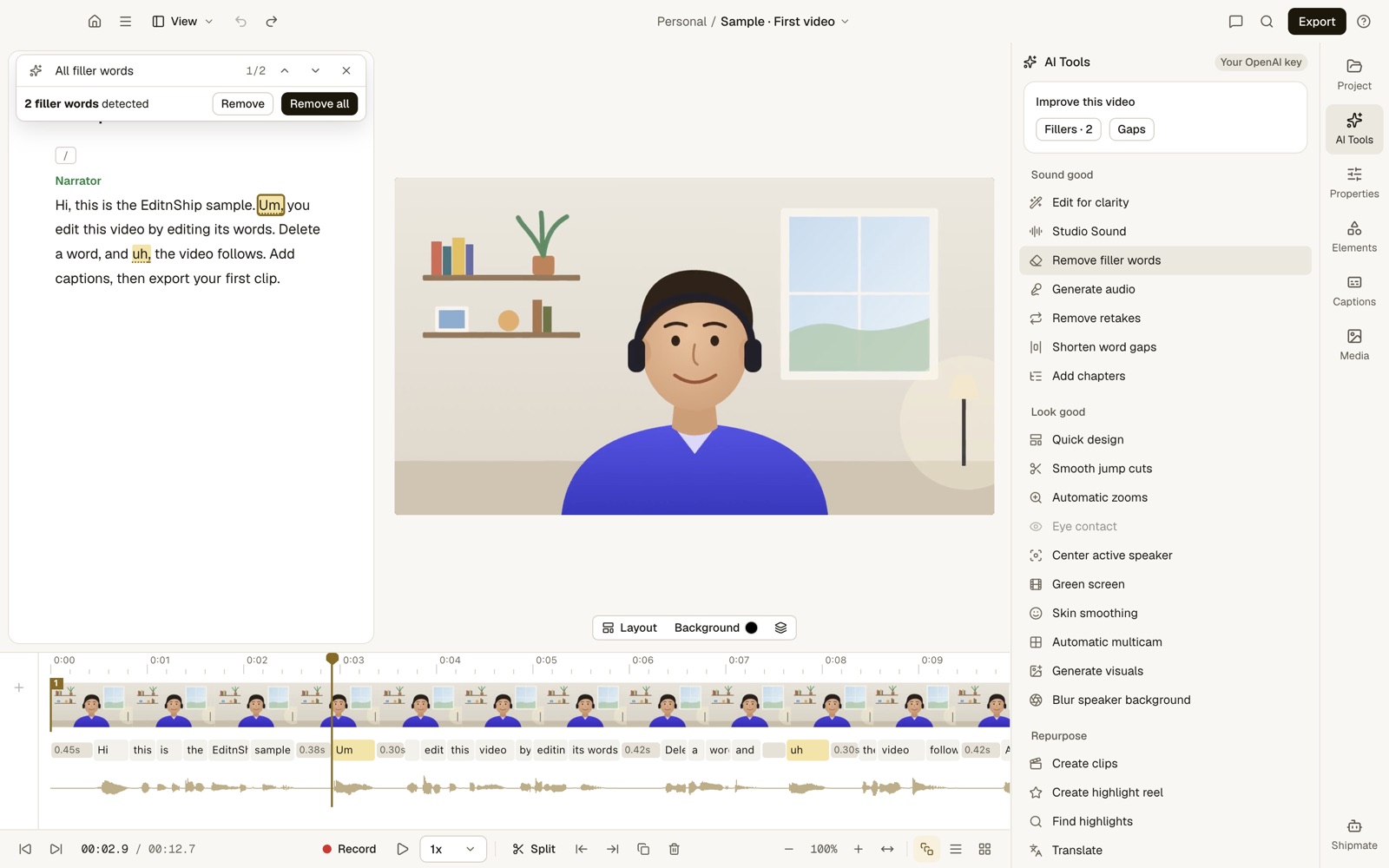
What to notice: both fillers are marked in the text and on the timeline. Remove all cuts them in one step, on your Mac. The badge in the corner says my OpenAI account was connected. Filler removal didn't use it.
Sound cleanup uses Apple's own voice isolation, which runs on your Mac. You pick Low, Medium or High strength. It needs no internet.
In the screenshot the panel still says Studio Sound. It's EditnShip's own sound cleanup, not Descript's tool.
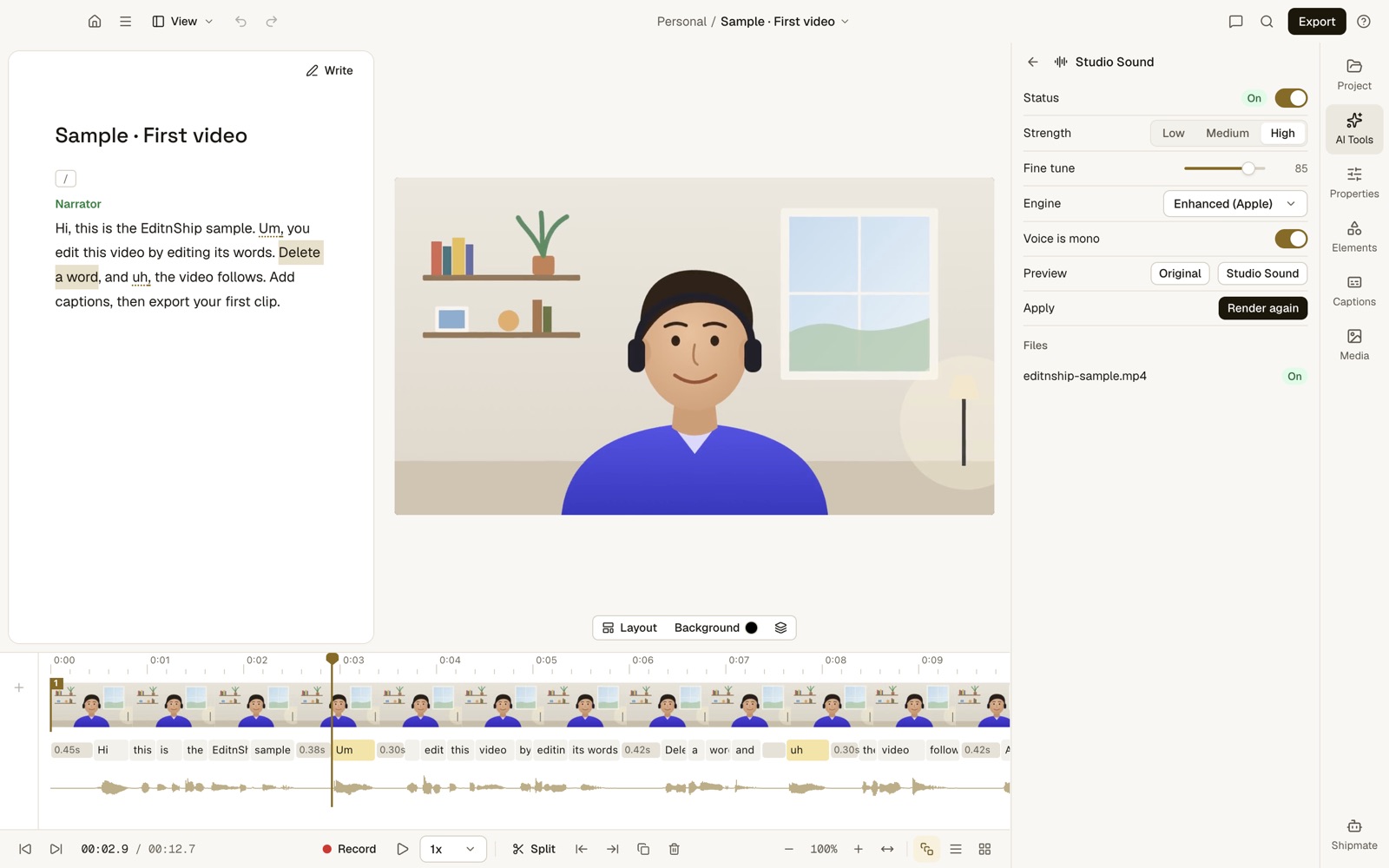
What to notice: you can play the original and the cleaned-up sound before you keep it. Running it again uses no credits.
To be fair, I haven't run a listening test against Descript's Studio Sound. So EditnShip wins on cost here, not on proven sound quality.
Transcribing happens on your Mac too. The app downloads a speech-to-text model once, about 1.6 GB. After that it works offline, and your video never leaves your Mac.
The $29 app also has no media hour cap. It exports up to 4K. On Descript, 4K means Creator or higher.
For Shipmate, the AI helper you type to, you connect your own AI account, such as OpenAI. You do that with an API key, a code that lets the app use your account. OpenAI then bills you for what you use.
EditnShip also sells monthly plans with AI credits, if you'd rather not use your own AI account. Here's the full list, checked on November 12, 2026:
| Option | Monthly | Yearly | AI credits |
|---|---|---|---|
| Mac app | $29 once, with updates | None. Use your own AI account, or no AI | |
| Starter | $15 | $126 | 100 a month |
| Pro | $29 | $243.60 | 200 a month |
| Advanced | $69 | $579.60 | 500 a month |
I'll be straight with you: my monthly plans cost more than Descript's. They aren't the budget option. The $29 app is.
The credits aren't the same unit either. EditnShip spends credits only on AI requests to Shipmate. 100 credits cover 100+ edits. Filler removal, sound cleanup and transcribing on your Mac use none.
Every plan includes every feature and adds a browser editor. Some features only work in the Mac app. See the pricing page for details, or EditnShip vs Descript for a full comparison.
Is Descript Worth It?
Descript is worth it if you use Windows, edit with a team, record remote guests, or need AI background removal or Eye Contact. Here are the 6 cases:
- You use Windows. EditnShip runs only on Macs.
- You edit with a team. Creator and Business add people to one drive. EditnShip is for one person.
- You interview remote guests. Rooms records up to 10 people. EditnShip can't. See Descript vs Riverside for that job.
- You have no green screen. Descript's Green Screen removes your background with AI. EditnShip can only blur it, or remove a real green screen behind you.
- You want Eye Contact. Descript makes you look at the camera. EditnShip doesn't have this.
- You want to try before paying. Descript's Free plan lets you test it at $0. EditnShip has no free version.
If two or more of these fit you, Descript is likely worth it.
It's probably not worth it if:
- You edit alone and clean up more than 6 long videos a month. Hobbyist's credits can run out, and it can't buy more.
- You want your video to stay on your computer. Descript uploads files to the cloud to transcribe them.
- You edit on a Mac and mostly need cuts, fillers and sound. A one-time app covers that. Also, Descript's filler removal works in English only.
My Descript review goes deeper. Here are more Descript alternatives if it's not for you.
Descript Discounts: 5 Ways to Pay Less
Staying with Descript? These 5 habits cut the bill:
- Pay yearly, once you're sure. It saves up to $180 a year per person.
- Clean up last. Credits are charged every time you run a tool. Run Studio Sound and filler removal once, on your final cut.
- Watch the Usage tab. In Descript, open Settings, then Usage. It shows what each AI run cost.
- Ask about special rates. The pricing page has a form for students, teachers and nonprofits. It doesn't list the discount.
- Trim before you upload. Media hours count what you add, so cut dead footage first.
Want to skip monthly bills? See video editors without a monthly subscription.
Thinking of leaving instead? Here's how to cancel your Descript subscription.
Is Descript Pricing Fair? My Verdict
Descript pricing is fair for teams. Business at $50 a month per person buys shared editing, remote recording and 1,500 credits.
For one person, the credits are the weak spot. Hobbyist's 400 credits can be gone after a handful of long videos.
If you edit alone on a Mac, the $29 EditnShip app does the everyday clean-up with no credits and no media cap.
My advice: count the videos you made last month. Then check them against the credit table above before you pick a plan.
Frequently Asked Questions
How much does Descript cost per month?
Descript's paid plans cost $16 to $50 a month per person billed yearly, or $24 to $65 billed monthly. Paying yearly saves 23% to 33%, but you pay the whole year up front. Prices checked November 12, 2026.
Is Descript free, and is there a free trial?
Descript has a Free plan at $0 with 1 media hour a month and 100 AI credits once. Exports stop at 720p with a watermark. There's no trial of the paid plans, and the Free plan needs no card.
What's the difference between media hours and AI credits?
Media hours are how much audio and video you add or record. AI credits pay for AI tools like Underlord, Studio Sound and filler removal. Both reset every month.
Do Descript credits roll over?
No. Unused media hours and AI credits reset when your plan renews. When credits run out, Creator and Business can buy top-ups, which last 12 months. Free and Hobbyist wait or upgrade.
What's the difference between Descript Hobbyist and Creator?
Creator gives 30 media hours instead of 10, and 800 AI credits instead of 400. It adds 4K export, room for 3 people and top-ups. It costs $24 a month billed yearly, versus $16.
How much does one video cost on Descript?
It depends on how many you make. For example, say you post 4 videos a month on Hobbyist, billed yearly. That's $16 a month, or $4 a video, as long as you stay within your media hours and credits.
What's the cheapest way to remove the Descript watermark?
Pay for Hobbyist, the cheapest paid plan. It costs $16 a month billed yearly ($192 a year) or $24 month to month. Only the Free plan adds the watermark.
Did Descript change its prices?
Yes. Old plans counted transcription hours, and the current ones count media hours and AI credits. Since November 17, 2025, Descript has moved old Legacy and Sunset plans to the new ones at each person's next billing date.
How do I cancel Descript?
You cancel from your Descript subscription page. Your plan stays on until the term ends. Descript may return a plan charge only if you ask within 48 hours of the invoice. Here's how to cancel step by step.
Is there a one-time purchase alternative to Descript?
Yes. EditnShip is a $29 Mac video editor you pay for once. Its text editing, filler removal and sound cleanup use no credits. It needs an M1 Mac or newer, and monthly plans with AI credits are sold separately.
Now I'd like to hear from you: which Descript plan are you on, and do your credits last the month? Email me, and I'll answer every one.
About the author
RH Fardin
I'm an SEO and growth marketer and web developer, and I build and market EditnShip myself. I've spent 5+ years on 120+ projects for 50+ clients.
Sources
- Descript pricing (plans, storage, upload and web-link limits, plan features, payment and cancelling FAQ), checked on November 12, 2026
- Descript: media minutes and AI credits (credit tools, 30-credit cap, Usage tab), checked on November 12, 2026
- Descript top-ups, checked on November 12, 2026
- How billing works in Descript and cancelling mid-cycle, checked on November 12, 2026
- Descript Legacy and Sunset plans, checked on November 12, 2026
- Studio Sound and filler words, checked on November 12, 2026
- EditnShip pricing and terms, checked on November 12, 2026
Checked on November 12, 2026. Prices change often, so check before you buy. All product names are trademarks of their owners, shown here to identify their products. EditnShip isn't affiliated with Descript.
Related: EditnShip vs Descript · 10 best Descript alternatives · Descript review