Descript Review (2026): What You Get, Where It Runs Out, Who It Suits
 RH FardinMaker of EditnShip · Updated November 15, 2026

Official Descript screenshot, from descript.com.
You keep hearing that Descript makes video editing as easy as editing a doc.
But is it worth paying for every month?
Most Descript reviews list the features and give a star rating. This Descript review shows you what each plan really gets you, where the credits run out, and who it suits. Every price was checked on November 12, 2026.
One thing first: I paid for Descript myself. Then my credits ran out, and I built my own Mac editor, EditnShip. So I'll be clear about where Descript is still the better pick.
Let's dive in.
Descript Review: Key Takeaways
- Descript's paid plans cost $16 to $50 a month billed yearly, or $24 to $65 month to month, per person (checked November 12, 2026).
- Studio Sound and filler word removal each cost up to 30 credits per file. By my math, the 400-credit Hobbyist plan covers as few as 6 long videos a month.
- Hobbyist can't buy extra credits. Top-ups start at $35 for 350 credits, on Creator and Business only.
- Descript wins for teams, remote interviews and Windows. Rooms records up to 10 people, and it runs on Mac, Windows and the web.
- User ratings are split. Product Hunt reviewers give Descript 4.4 out of 5 (41 reviews), and Trustpilot 2.5 out of 5 (294 reviews), checked November 12, 2026.
- EditnShip, the Mac editor I built, is $29 once. Its filler removal and sound cleanup use no credits. Monthly plans with AI credits are sold separately.
Descript review at a glance
| Area | My verdict | Why |
|---|---|---|
| Editing by text | Excellent | Delete a word in the transcript, and the video cuts |
| AI tools | Excellent | Underlord, Studio Sound, Eye Contact, Green Screen, avatars |
| Remote recording | Excellent | Rooms records up to 10 people |
| Price | Fair | $16 to $65 a month, per person |
| Credits | Weak on Hobbyist | 400 a month, no top-ups on that plan |
| Offline use | Weak | Transcription uploads first, and Studio Sound needs internet |
| Languages | Mixed | Captions in 61 languages, but filler removal is English only |
| Overall | Good, with limits | Great editor, tight credits on Hobbyist |
| Best for | Teams, podcasters with remote guests, Windows users | |
What Is Descript and How Does It Work?
Descript is a video and podcast editor. It types out everything you say. Then you edit the video by editing that text.
Delete a sentence in the transcript, and the video cuts with it.
For talking videos, that's much faster than cutting on a timeline. A timeline is the strip of video frames that most editors use.
Descript runs on Mac, Windows and in a web browser. Your projects live in the cloud, meaning on Descript's servers.
You pay by the month or the year, per person. Each plan gives you two allowances:
- Media hours: how much audio and video you can upload or record each month.
- AI credits: what Descript's AI tools spend each time you use them.
Unused hours and credits don't roll over. Descript's help center says so plainly.
Keep those two allowances in mind. They decide whether Descript feels generous or tight.
My Story: Out of Credits After 2 or 3 Videos
Here's what happened to me.
I was on Descript's basic plan, paying about $25 a month.
After two or three videos, my AI credits were gone.
After that, I couldn't remove my background. And I couldn't improve my voice quality. On Descript, both of those tools spend AI credits.
When that happens on the basic plan, you have three choices: wait for next month, upgrade, or publish videos that sound worse.
That's why I built EditnShip. It fixes the voice part, on your Mac, with no credits.
To be clear, it doesn't fix the background part. EditnShip has no AI background removal. It can blur your background, or replace a real green screen behind you.
And none of this makes Descript a bad app. It means the cheapest plan fits light use, not weekly videos.
Descript Features: What You Get
Let's start with the good part. Descript does a lot, and much of it well.
1. Editing by text
This is the core of Descript, and it's excellent.
You import a video, and Descript writes a transcript. Descript says accuracy can reach up to 95% with clear audio.
Then you fix mistakes in the text, delete bad takes, and move sentences around. The video follows.
There's a catch, though. Transcription starts only after your file uploads to the cloud. So a slow connection means a slow start.
2. Underlord, the AI co-editor
Underlord is Descript's AI helper. You type what you want, and it edits.
Descript's help center lists what it can do. It adds and styles captions, finds clips, makes vertical versions, adds zooms and translates.
Two things to know. First, Underlord is still in beta. Second, every message uses credits. See Descript Underlord explained.
Descript doesn't publish a fixed price per message. It says the cost changes with the model and the task, so the same request can cost different amounts. You only see the cost after, in the Usage tab.
3. Studio Sound
Studio Sound cleans up your voice. It cuts room echo and background noise, so a laptop mic sounds closer to a studio mic.
But it needs internet, and it costs credits. The cost grows with the length of the file, up to 30 credits each time you run it.
4. Filler word removal
Descript finds filler words like "um" and "uh" and removes them in one step.
It saves a lot of time, but it's English only and costs credits.
5. Recording: Rooms and the screen recorder
This is where Descript is hard to beat.
Rooms lets you record up to 10 people remotely. Hobbyist includes 5 Rooms hours a month. Creator gets 15, and Business gets 25.
The screen recorder runs from the menu bar and records for up to 4 hours.
6. Captions, clips and translation
Captions come from your transcript, so your edits carry over. The styles go deep, with word-by-word highlighting.
Descript can also find short clips in a long video. It makes 1 to 20 clips, from 10 seconds to 5 minutes long.
For other languages, Descript translates captions into 61 languages and dubs audio into 30.
7. The AI extras
Descript has several tools few rivals offer:
- Eye Contact: makes you look at the camera while you read a script.
- Green Screen: removes your background with AI, no real green screen needed.
- AI voices and avatars: stock voices, custom voices, and an avatar gallery.
- Regenerate: fixes a word or line by voicing it again, so you don't re-record. Descript's old Overdub page now leads here. More in Descript Overdub explained.
- AI video generation: makes video clips from a prompt.
All of these spend credits too. That brings us to the part most reviews skip.
Descript Limitations: Where Credits Run Out
Descript's main limits are AI credits, media hours, internet use and export quality on cheaper plans. They aren't hidden. They're spread across the pricing page and the help center.
So I put them in one place. Walk through these 5 steps before you pay.
Step #1: Count the credits each video uses
On current plans, Studio Sound and Remove Filler Words both spend credits. Descript's help center says the cost grows with the job: longer audio, or more filler words removed.
Each one stops at 30 credits per file, per run. Here's how Descript AI credits work.
Descript doesn't say how long a video must be to hit that cap. So the table below shows the worst case: videos long enough to hit it.
The test steps further down show you your real number.
A long video can use 30 credits for Studio Sound and 30 more for filler removal. That's 60 credits before you ask Underlord a single question.
| Plan | AI credits | Long videos cleaned up once | Cleaned up twice |
|---|---|---|---|
| Free | 100, one time | 1, ever | 0 |
| Hobbyist | 400 a month | 6 a month | 3 a month |
| Creator | 800 a month | 13 a month | 6 a month |
| Business | 1,500 a month | 25 a month | 12 a month |
How I got these numbers
I took each plan's credits from Descript's pricing page on November 12, 2026, and divided them by 60. That's the 30-credit cap for Studio Sound plus the 30-credit cap for filler removal. "Twice" means running both tools again on a second version of the video, so 120 credits.
Shorter videos cost less, so you'd fit more. Underlord messages also use credits, and Descript doesn't publish how many. With Underlord, your real number is lower.
Look at the "twice" column on Hobbyist: 3 videos.
That's close to what happened to me.
Step #2: Check if you can buy more
When credits run out on Creator or Business, you can buy a top-up. On Hobbyist, you can't.
| Top-up | Price | Plans |
|---|---|---|
| 350 AI credits | $35 | Creator, Business |
| 1,000 AI credits | $80 | Creator, Business |
| 4,000 AI credits | $200 | Creator, Business |
| 5 media hours | $25 | Creator, Business |
From Descript's top-ups help page, November 12, 2026. Top-ups expire 12 months after purchase.
So on Hobbyist, an empty balance means you wait for next month or upgrade.
Step #3: Count your media hours
Every upload and recording counts against your media hours. That's 10 hours a month on Hobbyist, 30 on Creator and 40 on Business. More in Descript media hours.
Rooms sessions count by length, not by guest. A 1-hour call with 5 people uses 60 minutes.
Ten hours sounds like plenty. But if you record 30 minutes of raw footage for every 5-minute video, it goes fast.
Step #4: Check your internet and your Mac
Descript lists a minimum of 50 Mbps download and 10 Mbps upload. Slower speeds can delay uploads and project loading.
For a Mac, it needs macOS 14 or later. It recommends 16 GB of memory on Apple silicon, with 8 GB as the bare minimum. See Descript for Mac for the full setup.
Working on a plane with no Wi-Fi? Transcription and Studio Sound won't run. On slow cafe Wi-Fi, expect long waits. More in does Descript work offline.
Step #5: Check what your plan exports
The free plan exports 720p with a watermark. Hobbyist goes up to 1080p.
For 4K export, you need Creator or higher. The same goes for timeline export, which sends your edit to Premiere Pro, Final Cut Pro or Pro Tools for finishing.
One more limit: it's not a full timeline editor
Descript is built for talking videos. Edits heavy on B-roll (extra footage laid over your talking), or cinematic edits, are harder than in Premiere Pro or Final Cut Pro.
Product Hunt reviewers also mention two things: precise cuts are limited, and long projects can get slow (checked November 12, 2026).
The bottom line?
Descript is fair if you make a few videos a month. If you make one or more a week, plan for Creator, not Hobbyist.
Descript Pricing in 2026
Descript costs $16 to $50 a month per person billed yearly, or $24 to $65 month to month. There's also a free plan.
Here's every plan, checked on Descript's pricing page on November 12, 2026. A seat is one person's login.
| Plan | Billed yearly | Month to month | What you get |
|---|---|---|---|
| Free | $0 | 1 media hour a month, 100 credits once, 720p with a watermark, first 5 stock media results | |
| Hobbyist | $16 a month | $24 a month | 10 hours, 400 credits a month, 1080p, 1 seat, first 12 stock media results |
| Creator | $24 a month | $35 a month | 30 hours, 800 credits a month, 4K, up to 3 seats, all stock media, timeline export |
| Business | $50 a month | $65 a month | 40 hours, 1,500 credits a month, 4K, up to 5 seats, timeline export, priority support |
| Enterprise | Custom quote | Custom credits and media, single sign-on (one company login for everyone) | |
What to notice: yearly cost for one person. The first three bars are billed yearly. Paying Business month to month costs $780 a year. Prices from descript.com/pricing, November 12, 2026.
Paying yearly cuts Hobbyist from $288 to $192. That's a third off.
Want the full breakdown? See my Descript pricing guide.
Who Is Descript Best For?
Descript is best for teams, podcasters with remote guests and Windows users. Here's the full list:
- Podcasters with remote guests. Rooms records up to 10 people. That alone justifies it for many shows.
- Teams. Creator has up to 3 seats and Business up to 5, with shared drives.
- Windows users. Descript has a Windows app.
- People who read scripts to camera. Eye Contact fixes your gaze.
- People with no green screen. AI Green Screen removes the background for you.
- Creators who need many languages. Captions in 61 languages, dubbing in 30.
- Light users. One or two short videos a month fit Hobbyist fine.
Who Should Skip Descript
Descript is a poor fit if any of these sound like you:
- You make several videos a week on a budget. Hobbyist credits run out, and you can't top up.
- You re-edit a lot. Every new run of Studio Sound or filler removal charges again.
- You speak Spanish, French or German on camera. Filler removal is English only.
- You work offline, or don't want to upload. Transcription and Studio Sound need the cloud.
- You'd rather pay once. Descript is a subscription only.
- You make YouTube videos heavy on B-roll. In my view, a full timeline editor fits you better.
Two or more of these? Then a different tool will likely cost you less. See the alternatives below.
The Mac Option I Built: EditnShip
If you edit alone on a Mac, here's the tool I built after my credits ran out.
EditnShip is a Mac video editor for talking videos. Like Descript, you edit the video by editing its transcript.
The difference? The everyday clean-up runs on your Mac, with no credits.
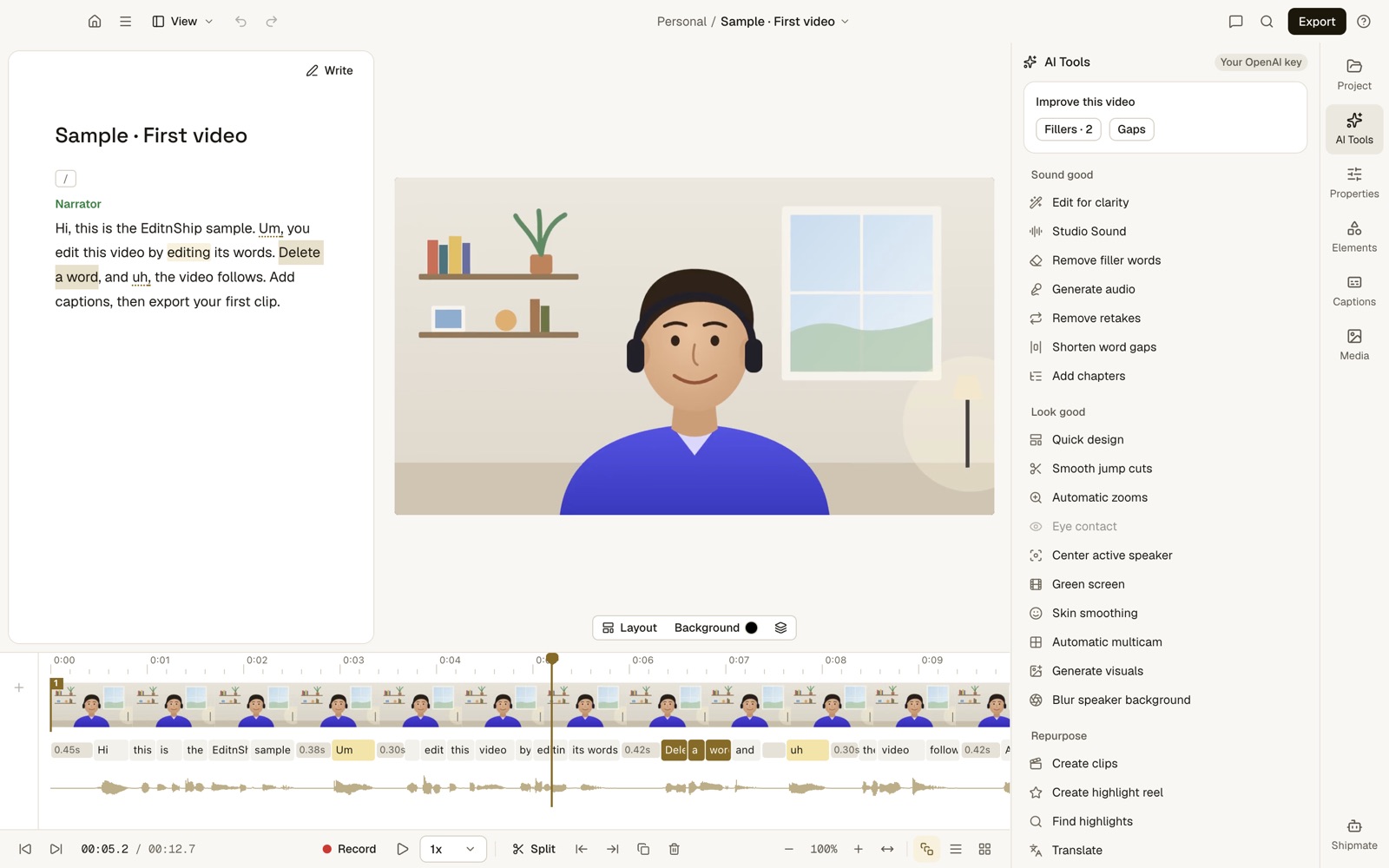
What to notice: each word in the transcript sits under its frames on the timeline. Delete the word, and those frames go too. In the AI Tools list, Eye contact is greyed out because it doesn't work. Green screen needs a real green screen behind you.
Filler words: no credits, 5 languages
EditnShip finds ums, uhs, stutters and phrases like "you know." It works in English, Spanish, French, German and Portuguese.
It runs on your Mac. It uses the timing of each word in your transcript, so it needs no AI service and no credits. Here's how filler removal works.
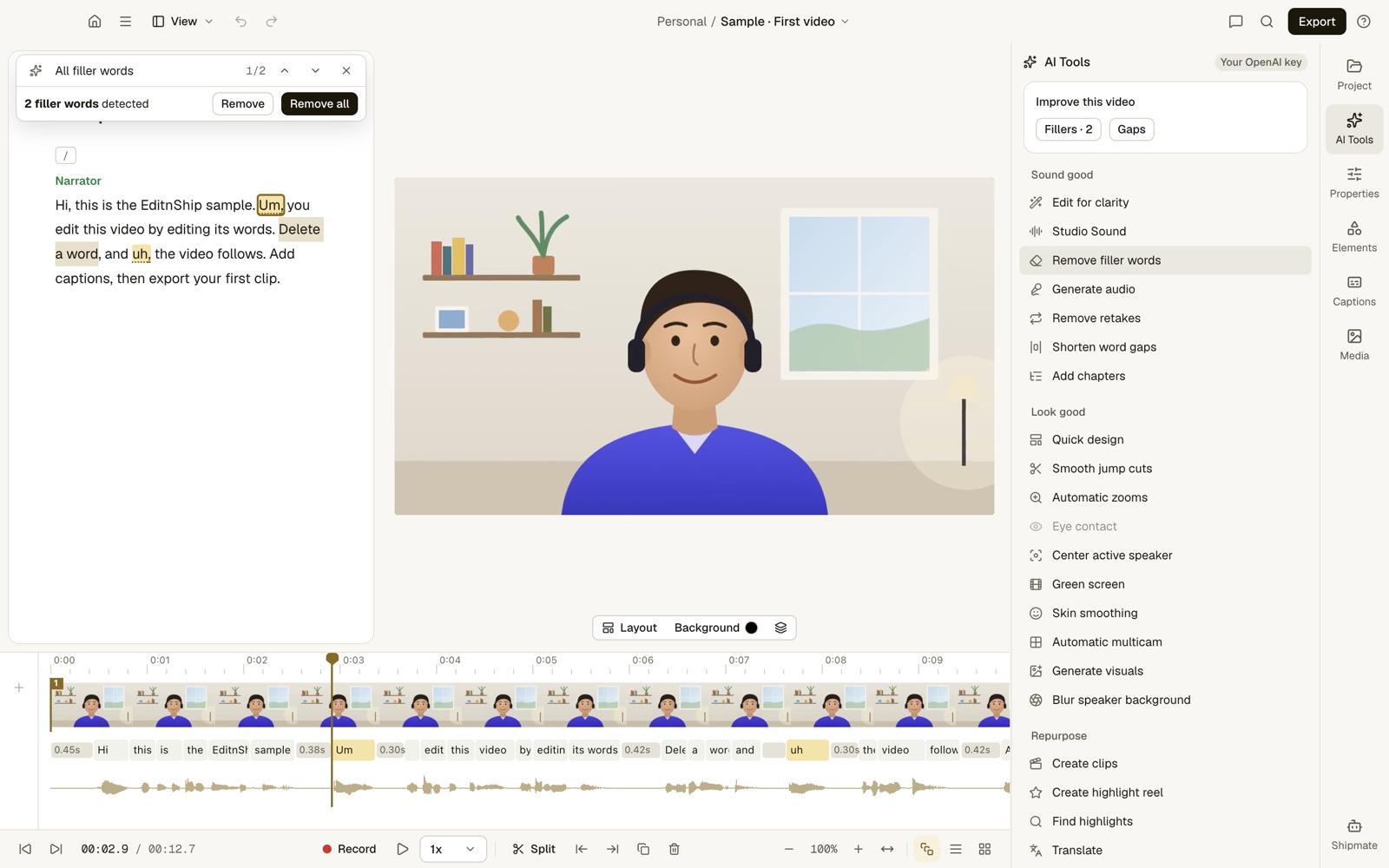
What to notice: 2 fillers found and highlighted. Remove all deletes both in one step.
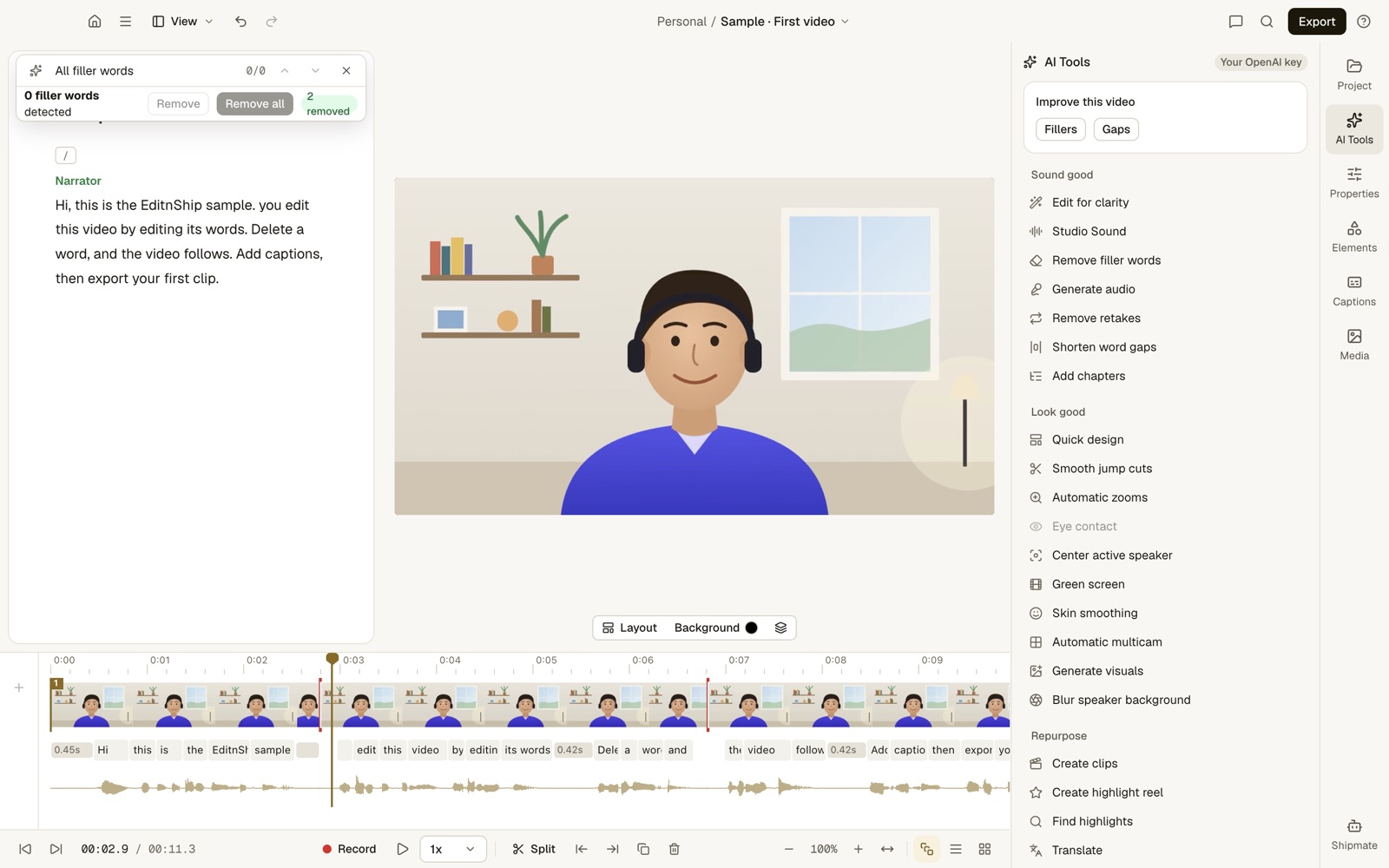
What to notice: 2 removed, and the clip dropped from 12.7 to 11.3 seconds. This is the short sample video that comes with the app. You can run it again on every version, with no credits.
Sound cleanup: on your Mac, no credits
Sound cleanup uses Apple's voice isolation, a voice filter built into macOS. It runs on your Mac. You pick Low, Medium or High strength, then compare before and after.
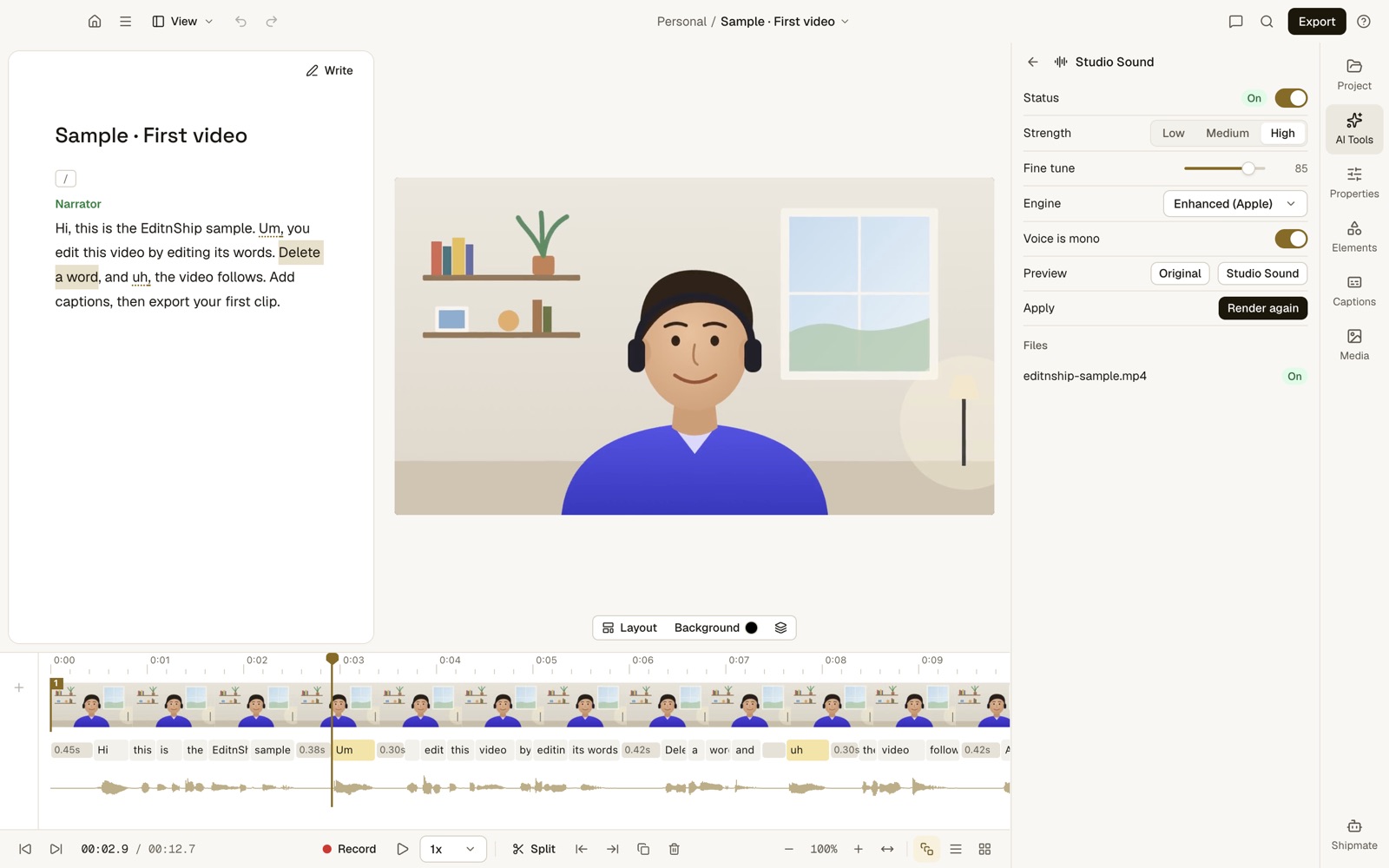
What to notice: the Preview row lets you hear the original next to the cleaned-up sound before you keep it. The app's panel is also labelled Studio Sound, but it isn't Descript's tool. It's EditnShip's own sound cleanup, with no credits.
To be fair, I haven't run a listening test against Descript's Studio Sound. So I'll claim the cost win, not a quality win.
Shipmate: the AI helper you type to
Shipmate works like Underlord. You type "remove the filler words," and it makes the edit. Each edit is one undo step.
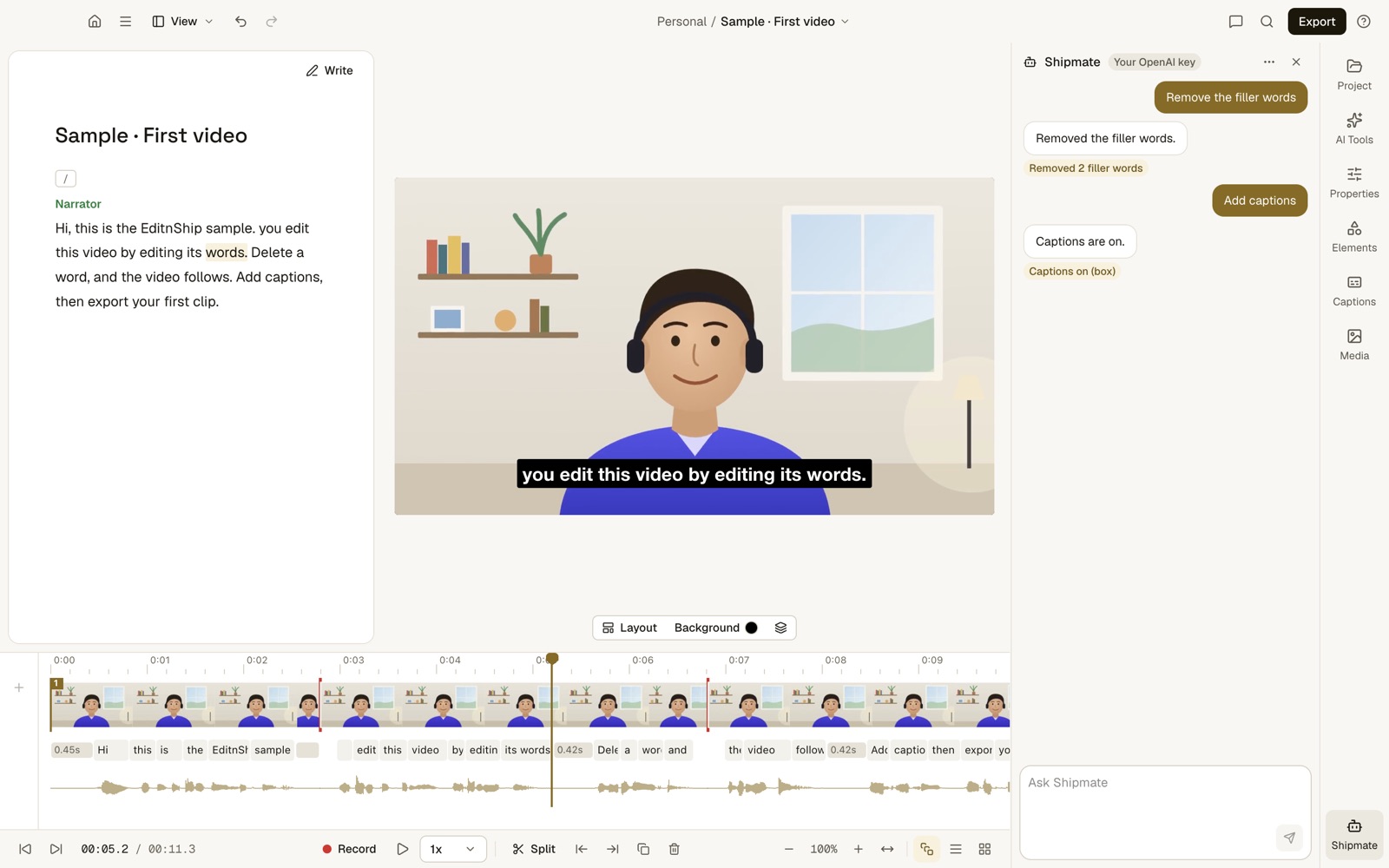
What to notice: two requests, two edits, and Shipmate says exactly what changed. This capture used my own OpenAI key. On a plan, Shipmate spends your credits instead.
On November 10, 2026, I tested it. I gave Shipmate 100 everyday requests. 10 of them were traps: requests a careful editor should say no to.
Running on Claude Opus 5.5, one of Anthropic's top AI models, it passed 100 out of 100. The OpenAI capture above wasn't part of that test.
In fairness, plans run a smaller Claude model. I haven't put that one through the same test yet.
How you pay
There are two ways to buy, sold separately:
- The $29 Mac app, once, with updates. No media hours to run out of, and 4K export.
- Monthly plans with AI credits. Shipmate runs on the plan's credits, and you get a browser editor too. 100 credits cover 100+ edits. An edit is one change Shipmate makes, like adding captions. See pricing.
What does the $29 app do with no AI at all? Quite a lot. You can:
- Transcribe your video on your Mac
- Cut it by editing the text
- Remove filler words and shorten pauses
- Clean up the sound
- Add captions and make a vertical clip
- Export in up to 4K
For Shipmate in the $29 app, you add your own AI key. That's a code from your account with an AI company, such as OpenAI. That company bills you for what you use.
Transcription can run on your Mac too. You download the speech model once, about 1.6 GB. After that, your video never leaves your Mac.
What EditnShip can't do
I'd rather you know now. EditnShip has:
- No Windows app. It needs a Mac with an M1 chip or newer and macOS 14 or later. To check, open the Apple menu and choose About This Mac. Intel Macs can't run it.
- No remote guest recording like Rooms.
- No Eye Contact.
- No AI background removal. You can blur the background, or replace a real green screen behind you.
- No team editing. It's built for one person.
For the full side-by-side, read EditnShip vs Descript.
How to Test Descript Before You Pay
Still leaning toward Descript? Test it first, so you don't get the surprise I got.
Step #1: Start on the free plan. It gives you 1 media hour a month and 100 credits, once.
Step #2: Edit one real video, start to finish. Use a video the same length as your usual ones.
Step #3: Open the Usage tab. In Descript, open Settings, then choose Usage in the left sidebar. It shows what each tool and Underlord message cost.
Step #4: Multiply by your month. Take that video's credit cost and multiply it by how many videos you make. Compare it with 400 for Hobbyist or 800 for Creator.
Step #5: Clean up last. Run Studio Sound and filler removal once, on your final cut. Each new run charges again.
This takes one afternoon, and it tells you exactly which plan you need.
Descript Reviews: What Other Users Say
Users rate Descript well for everyday text editing, and poorly for credits, bugs and support. Here's what I found on November 12, 2026.
| Site | Rating | What users praise | What users complain about |
|---|---|---|---|
| Product Hunt | 4.4 out of 5, 41 reviews | Text editing, filler removal, transcription | Limited precise editing, slow support, sluggish on long projects |
| Trustpilot | 2.5 out of 5, 294 reviews | Text editing and transcription for daily use | Bugs and crashes, credits used up fast, trouble cancelling |
On Trustpilot, 43% of reviews are one-star and 37% are five-star. Trustpilot also notes that Descript hasn't recently asked its customers for reviews. So the people posting there chose to on their own.
G2 and Capterra blocked my checks, so I left their scores out rather than guess.
Still, the credit complaint matches my own. Thinking of leaving? Here's how to cancel Descript.
Descript Pros and Cons
- Editing by text is fast and easy to learn
- Strong AI tools: Underlord, Studio Sound, Eye Contact
- Rooms records up to 10 remote guests
- Runs on Mac, Windows and the web
- Captions in 61 languages, dubbing in 30
- A free plan to try it
- Studio Sound and filler removal spend credits
- No credit top-ups on Hobbyist
- Media capped at 10, 30 or 40 hours a month
- Filler removal is English only
- Transcription and Studio Sound need internet
- 4K and timeline export need Creator or higher
- Priority support only on Business
- Can get slow on long projects, users report
Descript Alternatives Worth a Look
If Descript doesn't fit, these are the tools people most often compare it with:
- Riverside: best when remote recording comes first. Descript vs Riverside.
- CapCut: best for short social clips. Descript vs CapCut.
- Premiere Pro: best for full timeline editing. Descript vs Premiere Pro.
- Final Cut Pro: best for full timeline editing on a Mac. Descript vs Final Cut Pro.
- EditnShip: best for one person on a Mac who wants cleanup with no credits.
All 10 are in my Descript alternatives list.
The Verdict: Is Descript Worth It?
Yes, for teams, podcasters and Windows users. Rooms, Eye Contact, team seats and the language list are hard to match.
Maybe, for light users. One or two videos a month fit Hobbyist fine. Test your credit use on the free plan first.
Probably not, for solo Mac creators who post every week. The credit meter will slow you down, like it did me. A $29 Mac app like EditnShip does the daily clean-up with no credits.
Frequently Asked Questions
Is Descript worth it in 2026?
Yes, if you edit with a team, record remote guests or use Windows. If you edit alone on a Mac every week, the credit limits get in the way. A one-time app like EditnShip may cost less.
How much does Descript cost?
Hobbyist is $16 a month billed yearly or $24 month to month. Creator is $24 or $35, and Business is $50 or $65, per person. Descript also has a free plan. Prices checked on November 12, 2026.
Why do my Descript credits run out so fast?
Studio Sound and filler word removal each cost up to 30 credits per file, every time you run them. Every Underlord message uses credits too. By my math, 400 Hobbyist credits clean up as few as 6 long videos a month.
Can I buy more Descript credits?
Only on Creator and Business. Top-ups start at $35 for 350 credits and expire after 12 months. On Hobbyist, you wait for your next billing month or upgrade.
Is Descript good for beginners?
Yes. Editing by text feels like editing a document, so it is easy to learn. The harder part is learning how credits and media hours work, so check the Usage tab early.
How accurate is Descript's transcription?
Descript says accuracy can reach up to 95% with clear audio. That's with clear audio, so a noisy recording will need more fixes. You fix mistakes by typing in the transcript.
Does Descript work offline?
Not fully. Transcription starts after your file uploads to the cloud, and Studio Sound needs internet. Descript lists a minimum of 50 Mbps download and 10 Mbps upload.
Can Descript export to Premiere Pro or Final Cut Pro?
Yes, on Creator and Business. Descript calls it timeline export, and it also covers Pro Tools. Free and Hobbyist can't use it (checked November 12, 2026).
What are the disadvantages of Descript?
Credits run out fast on the cheaper plans, and Hobbyist can't buy more. Studio Sound and transcription need internet, and filler removal is English only. Reviewers on Trustpilot and Product Hunt also report bugs, slow support and slowdowns on long projects (checked November 12, 2026).
What is the best Descript alternative for Mac?
For one person editing talking videos, EditnShip is a $29 Mac video editor with filler removal and sound cleanup that use no credits. Monthly plans with AI credits are also available. For teams or remote interviews, Descript is still the stronger choice.
Now I'd like to hear from you: how many videos do you get out of your Descript credits each month? Email me, and I'll answer every one.
About the author
RH Fardin
I build EditnShip myself, and I market it too. Before that, I spent 5+ years as an SEO, growth marketer and web developer, on 120+ projects for 50+ clients.
Sources
- Descript pricing, checked on November 12, 2026
- Descript: media minutes and AI credits and top-ups, checked on November 12, 2026
- Studio Sound and filler words, checked on November 12, 2026
- Descript Underlord, checked on November 12, 2026
- Descript transcription, checked on November 12, 2026
- Descript system requirements, checked on November 12, 2026
- Descript Rooms and screen recorder, checked on November 12, 2026
- Eye Contact, Green Screen, clips and captions, checked on November 12, 2026
- Descript Regenerate (the old Overdub page), checked on November 12, 2026
- Descript on Trustpilot, checked on November 12, 2026
- Descript on Product Hunt, checked on November 12, 2026
- EditnShip pricing and terms, checked on November 12, 2026
Checked on November 12, 2026. Prices change often, so check before you buy. All product names are trademarks of their owners, shown here to identify their products. EditnShip isn't affiliated with Descript.
Related: EditnShip vs Descript · 10 best Descript alternatives · Descript pricing · How to cancel Descript