Descript for Mac: How to Download the Desktop App (and a Mac-Only Option)
 RH FardinMaker of EditnShip · Updated November 16, 2026
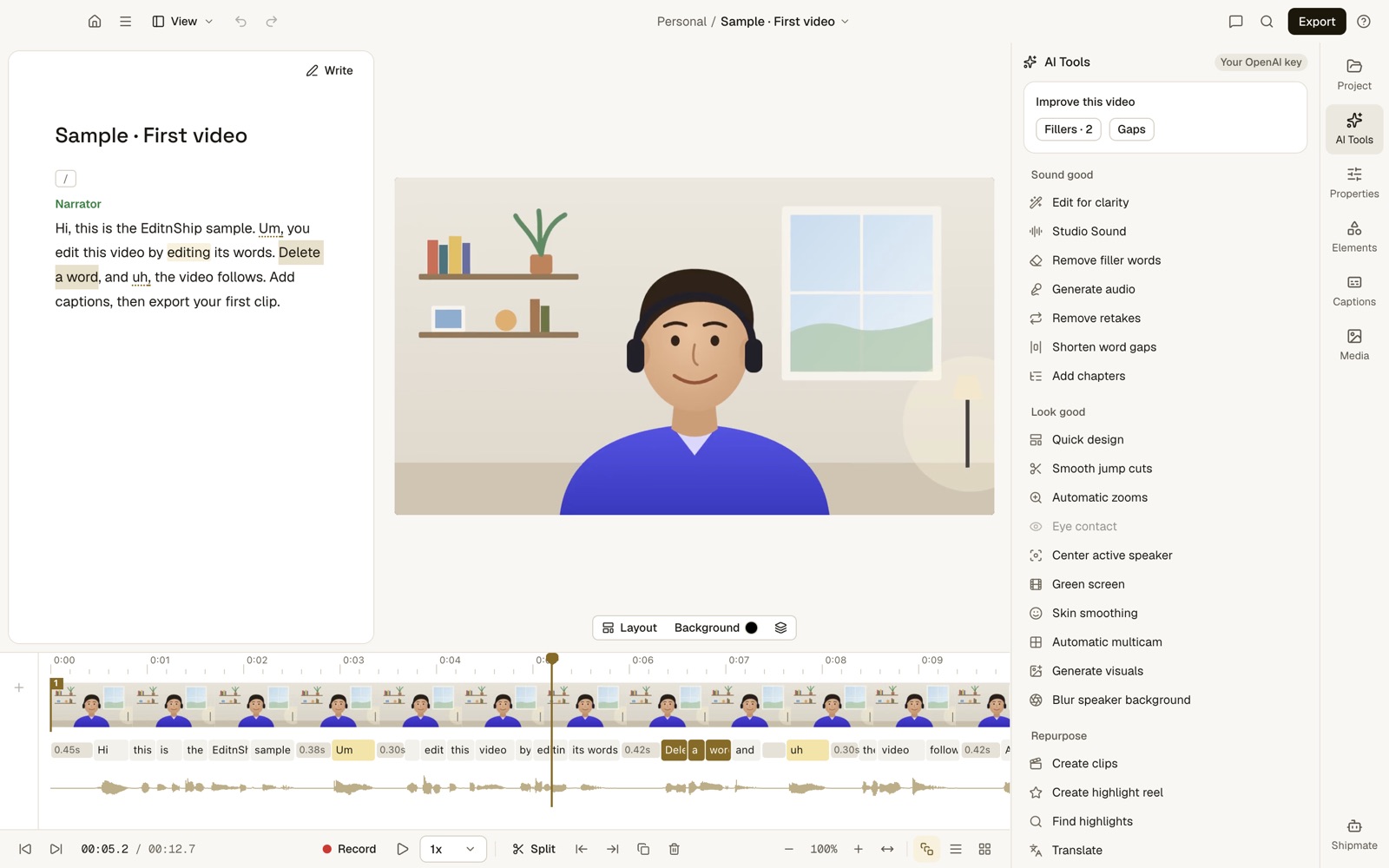
This is EditnShip, the Mac editor I built. Descript's app looks different (see its official image below).
You want Descript for Mac. But the download pages are thin, and one App Store listing isn't even Descript.
This guide shows you how to get the real Descript desktop app, step by step.
You'll also see what your Mac needs, the permissions to turn on, and what it costs. I checked every fact on Descript's own pages on November 12, 2026.
One thing first: I built EditnShip, a Mac-only editor, after my Descript credits ran out. So I'll also show you where Descript is still the better pick.
Let's get started.
Descript for Mac: Key Takeaways
- Descript's Mac app is a free download from descript.com. It isn't in the Mac App Store. A copycat listing there comes from a different company.
- It needs macOS 14 or later and at least 8 GB of memory. Descript recommends 16 GB and 20 to 40 GB of free space.
- Descript doesn't support offline editing. Its help center asks for at least 50 Mbps down and 10 Mbps up.
- Paid plans cost $16 to $65 a month per person. The download itself is free.
- Descript supports only versions from the last 3 months. Old builds on download mirrors can be years out of date.
Is There a Descript Desktop App for Mac?
Yes. Descript has a desktop app for Mac and one for Windows. You can also use it in a web browser at web.descript.com.
Descript is a text-based video editor. It types out everything you say, and you edit the video by editing the text.
Delete a sentence, and the video cuts with it.

Official Descript screenshot, from descript.com.
The Mac app now runs natively on Apple silicon. Apple silicon means Apple's own M1, M2, M3 or newer chips.
Natively means the app is built for those chips. Before, it ran through a translation layer made for Intel Macs, which slowed it down.
Descript's blog post on this, updated July 29, 2026, says removing that layer "made everything faster on M-series Macs." It gives no test numbers.
Here's the deal: the desktop app and the web app share one cloud account. Your projects sync to Descript's servers as you edit.
That matters a lot if your internet is slow. More on that below.
How to Download Descript on a Mac
Download it from descript.com/download, unzip it, drag it to Applications and sign in. It takes a few minutes.
Here are the steps from Descript's help center, checked on November 12, 2026.
Step #1: Check your Mac
Open the Apple menu (the apple in the top-left corner) and choose About This Mac.
Look for a line called Chip. If it says Apple M1, M2, M3 or newer, you have Apple silicon.
If the line is called Processor and names Intel, you have an Intel Mac. Apple's support page explains the same check.
Then look at the macOS line. You need macOS 14 (Sonoma) or later. Macs that can't update to macOS 14 can't run the current app.
Stuck on an older macOS? Descript points you to Descript for Web, its browser version. It officially supports Chrome, Edge and Opera.
Step #2: Download from descript.com
Go to descript.com/download and pick the Mac version. The download starts on its own.
Use only Descript's own site. Download mirrors list old builds, and I show you one in the mistakes below.
Step #3: Unzip and move it to Applications
The file arrives as a .zip, a packed file. Double-click it, and the Descript app appears next to it.
Then drag the Descript app into your Applications folder.
Step #4: Open it and sign in
Double-click Descript. If macOS asks whether you're sure, click Open.
Sign in, or create an account. Sign-in opens your web browser, so keep one handy. Then pick a project or start a new one.
Step #5: Decide about launch at login
This one is easy to miss.
Descript opens by itself when you log in to your Mac. It does this so its Screen Recorder stays in your menu bar, the row of icons at the top right.
Don't want that? Click the Descript icon in the menu bar, choose Settings and turn off Launch at login.
After that, Descript updates itself in the background. The update applies the next time you open the app.
Don't block those updates. Descript only supports the current version and versions from the last 3 months.
Step #6: Allow camera, microphone and screen recording
This is the usual reason Descript can't record your screen. macOS blocks it until you say yes.
The first time you record, macOS asks for permission. Click Allow.
Missed it? Open System Settings, then Privacy & Security. Turn on Descript under Camera, Microphone and Screen Recording.
4 Common Mistakes When Installing Descript on a Mac
These are the problems I'd watch for:
- Downloading a copycat from the App Store. Descript isn't sold there. On November 12, 2026, a listing whose web address reads "descript-ai-editing-tool" came from Driftwave Labs LLC. Its name now reads "Transcript & AI Video Editing." It's an iPad app "not verified for macOS," with $4.99 weekly and $14.99 monthly plans. It never says it's connected to Descript.
- Downloading from a mirror site. On November 12, 2026, FileHorse listed Descript 2.2.0 for "macOS 10.13 High Sierra or later." Its page was last updated June 10, 2025. That build is far outside Descript's 3-month support window.
- Running an old build on an M1 Mac. Descript told M1 users to delete the app and reinstall the latest version. That gets you the native Apple silicon build. The steps are below.
- Installing on a nearly full disk. Descript asks for 20 to 40 GB of free space and says to keep at least 20 GB free. A full disk slows big projects down.
How to Uninstall or Reinstall Descript on a Mac
Quit Descript and its Screen Recorder, drag the app to the Trash, then download it again from descript.com.
This is the fix Descript's Version 30 release notes give for getting the native Apple silicon build. It works for any messy install too.
Step #1: Quit Descript fully. Close the app. Then click the Screen Recorder icon in the menu bar, click the three dots at the top right and choose Quit.
Step #2: Delete it. Open your Applications folder and drag Descript to the Trash.
Step #3: Reinstall. Download the latest version from descript.com/download/mac. Then repeat Steps #3 and #4 above.
Your projects live in Descript's cloud, so deleting the app doesn't delete them.
Want to stop paying too? Cancel the plan in Descript's settings: Plan tab, Change plan, then Downgrade to Free. See how to cancel Descript.
Descript Mac System Requirements
Here's what Descript's help center lists for macOS, checked on November 12, 2026. If you have Apple silicon, you can skip the Intel rows.
| Part | What Descript asks for |
|---|---|
| macOS | 14 (Sonoma) or later |
| Chip | Apple silicon M1 or later, or Intel 7th Gen (Kaby Lake) or newer |
| Memory | 8 GB minimum. 16 GB recommended on Apple silicon. On Intel, 16 GB for HD and 32 GB for 4K |
| Graphics (Apple silicon) | The built-in graphics are enough |
| Graphics (Intel) | 4 GB of graphics memory for HD, 6 GB or more for 4K |
| Free space | 20 to 40 GB on the Mac's fast built-in drive |
| Screen | 1920 x 1080 or higher |
| Internet | At least 50 Mbps down and 10 Mbps up |
A few plain-English notes:
- Memory is the line called Memory in About This Mac. 8 GB runs it, but 16 GB is the comfortable number.
- Intel 7th Gen is a generation of Intel chips. It only matters if your Mac says Processor, not Chip.
- Free space is under Apple menu, System Settings, General, Storage.
- Internet speed is easy to check. Search "internet speed test" in your browser and run one. Slower links delay uploads, project loading and restoring old versions, Descript says.
Descript also warns that fanless Intel MacBook Air models may struggle with heavy work. That warning is only about Intel models.
Why do other sites list different requirements?
Because they're out of date. FileHorse still says macOS 10.13. Does It ARM, a site that tracks Apple silicon apps, still says Descript isn't native, based on a December 2023 build.
Descript's own pages say macOS 14 and native Apple silicon. Trust those.
The bottom line?
Any Apple silicon Mac on macOS 14 runs it. But 8 GB of memory is the floor, not the comfortable number.
Can You Use Descript on a Mac Without Internet?
No. Descript's help center says it plainly: "Descript doesn't support offline editing."
A desktop app sounds like it should work anywhere. Let me explain what this means day to day:
- Saving. Your edits are written to Descript's cloud as you make them. You need internet for changes to sync and back up.
- Transcription. It starts only after your file finishes uploading to the cloud.
- Sound cleanup. Descript's Studio Sound needs internet, and it uses AI credits.
- Signing in. Sign-in runs through your web browser, so it needs internet.
So on a plane, at a café with slow Wi-Fi, or with a big file, you wait. For more, see does Descript work offline?
Descript for Mac vs EditnShip at a Glance
Before the prices, here's how Descript's Mac app compares with EditnShip, the Mac editor I built.
| Descript for Mac | EditnShip | |
|---|---|---|
| Where to get it | descript.com/download (a .zip file) | A private download link after you buy (a .dmg file) |
| macOS | 14 or later | 14 or later. Screen recording needs 15 |
| Chip | Apple silicon, or Intel 7th Gen and newer | Apple silicon only (M1 or newer) |
| Other computers | A Windows app, plus a browser version | The app runs only on Macs. Monthly plans add a browser editor at app.editnship.com |
| Edit offline | No | Yes, after a one-time setup. AI features need internet |
| Where projects live | Synced to Descript's cloud as you edit | On your Mac |
| Transcription | Uploads your file first | On your Mac after a one-time download, or with an AI key |
| Price | Free plan, then $16 to $65 a month per person | $29 once, or monthly plans with AI credits |
the oldest macOS version Descript's Mac app supports, checked November 12, 2026
the download speed Descript asks for, plus 10 Mbps up
how old a Descript version can be and still get support
Is Descript Free on Mac? What It Costs
The download is free (more in is Descript free?). The Free plan gives 1 media hour a month at 720p with a watermark. Paid plans cost $16 to $65 a month per person.
Two words before the table. Media hours are how much video you can add each month. Credits are what Descript's AI tools spend.
| Plan | Billed yearly | Billed monthly | Media and AI |
|---|---|---|---|
| Free | $0 | 1 hour a month, 100 credits once, 720p | |
| Hobbyist | $16 a month | $24 a month | 10 hours, 400 credits a month, 1080p |
| Creator | $24 a month | $35 a month | 30 hours, 800 credits a month, 4K |
| Business | $50 a month | $65 a month | 40 hours, 1,500 credits a month, 4K |
Per person. The same prices apply on Mac, Windows and the web. From descript.com/pricing, checked on November 12, 2026.
That's where my own trouble started. On Descript's basic plan, I paid about $25 a month. After two or three videos, my AI credits were gone.
Then I couldn't clean up my voice or remove my background.
To be clear, EditnShip doesn't remove backgrounds with AI either. It blurs your background, or removes a real green screen behind you.
What I fixed was the credits. Sound cleanup and filler removal in EditnShip never use them. The full breakdown is in Descript pricing.
Is There a Mac-Only Alternative to Descript?
Yes. EditnShip is a $29 Mac video editor made only for Macs with Apple silicon. I built it after my credits ran out.
Like Descript, it's text-based: you edit the video by editing its transcript.
It doesn't run on Intel Macs, and there's no Windows version. If you have an Intel Mac, that's a real limit.
Here's why I made that trade: one kind of Mac let me use Apple's own tools on your Mac, instead of a cloud server.
Sound cleanup with Apple's voice isolation
EditnShip cleans up your voice with Apple's voice isolation, right on your Mac. It has Low, Medium and High strength, and uses no credits.
Here's how sound cleanup works.
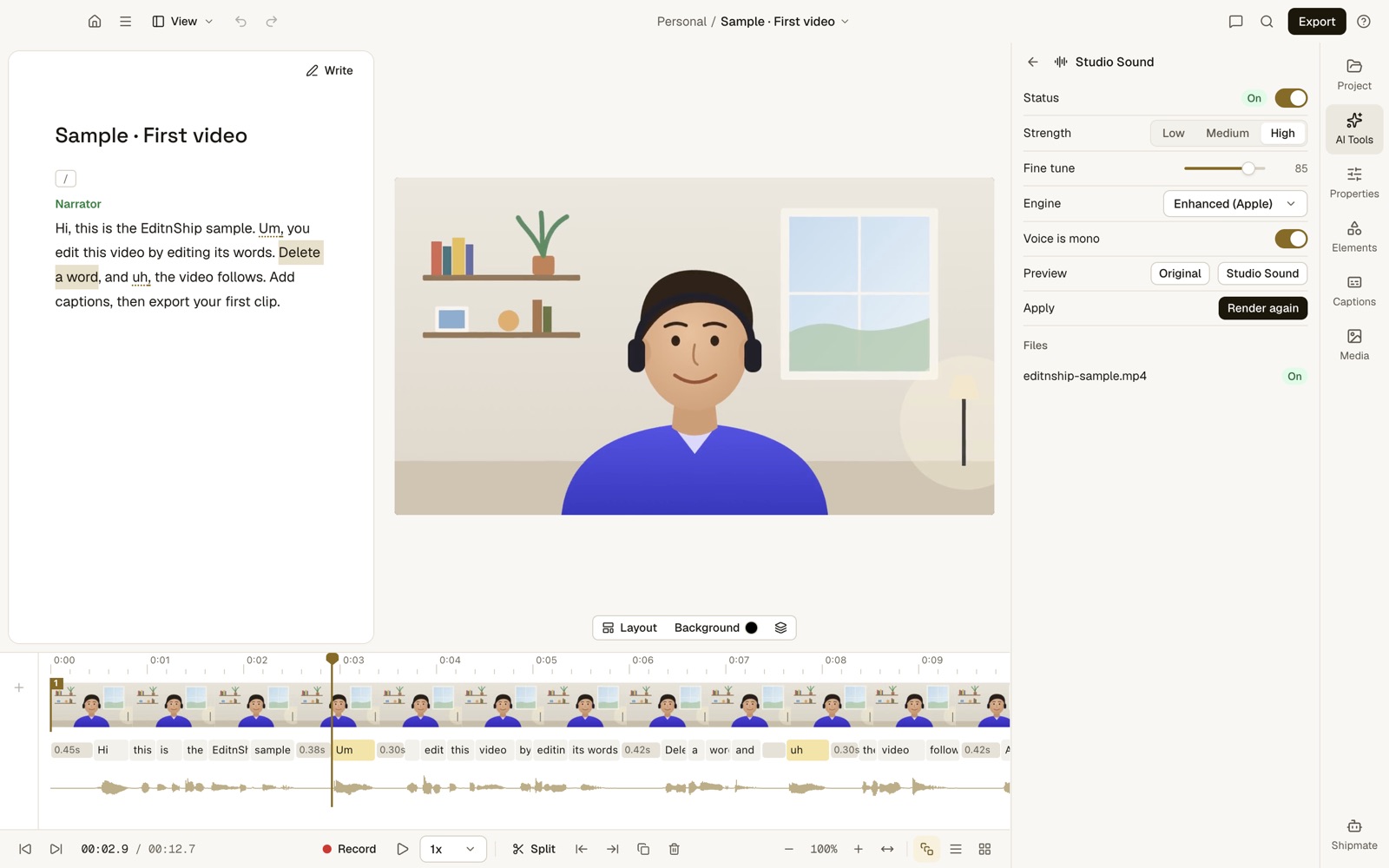
What to notice: the engine reads Enhanced (Apple). The two buttons let you hear the original and the cleaned-up sound before you keep it. The app labels this panel Studio Sound, but it's Apple's voice isolation, not Descript's feature.
To be fair, I haven't run a listening test against Descript yet. So EditnShip wins here on cost, not on proven quality.
Transcription that stays on your Mac
EditnShip can transcribe on your Mac. You download the speech model once, about 1.6 GB. Then it works offline.
After that, your video never leaves your Mac to be transcribed. You can also use an AI key, or a plan's credits. See how to transcribe video on your Mac.
Filler words removed on your Mac
EditnShip finds ums, uhs, stutters and filler phrases such as "you know" in your video.
It uses the exact time each word was spoken, so no AI service is needed.
It works in English, Spanish, French, German and Portuguese.
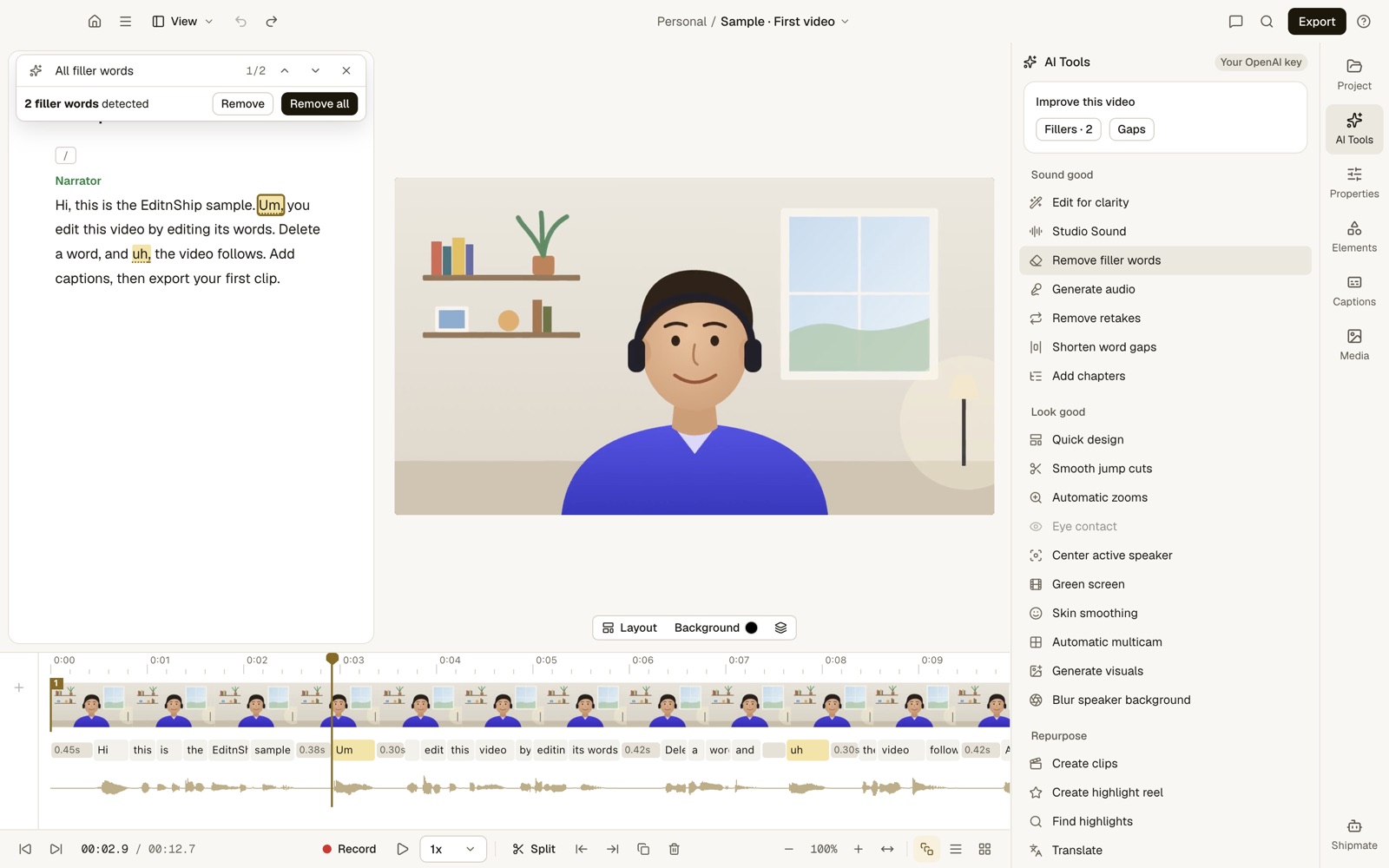
What to notice: 2 fillers found, each highlighted in the text. Remove all cuts both, with no internet and no credits.
Screen recording through Apple's own system
Recording uses Apple's screen capture system on macOS 15. There are five modes: Camera, Screen, Screen + Camera, Audio only and Studio Record.
See my screen recorder for Mac guide for the full walkthrough.
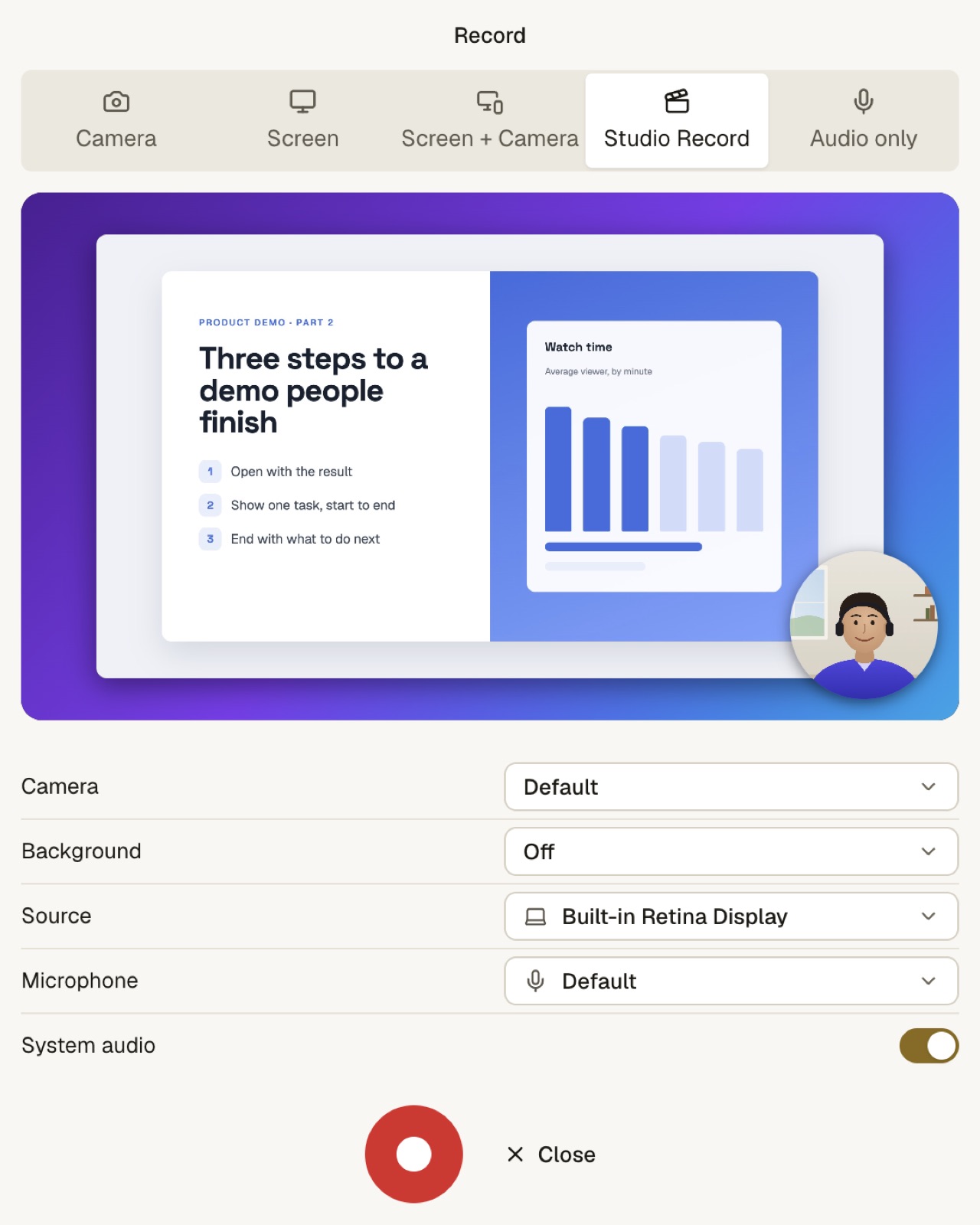
What to notice: Studio Record puts your screen and a round camera bubble on your Mac's wallpaper, in one preview. It also zooms in where you click.
4K export on the $29 app
Every way to buy EditnShip exports up to 4K, including the $29 app. It saves in the two common video formats, H.264 and HEVC.
Descript's Hobbyist plan stops at 1080p.
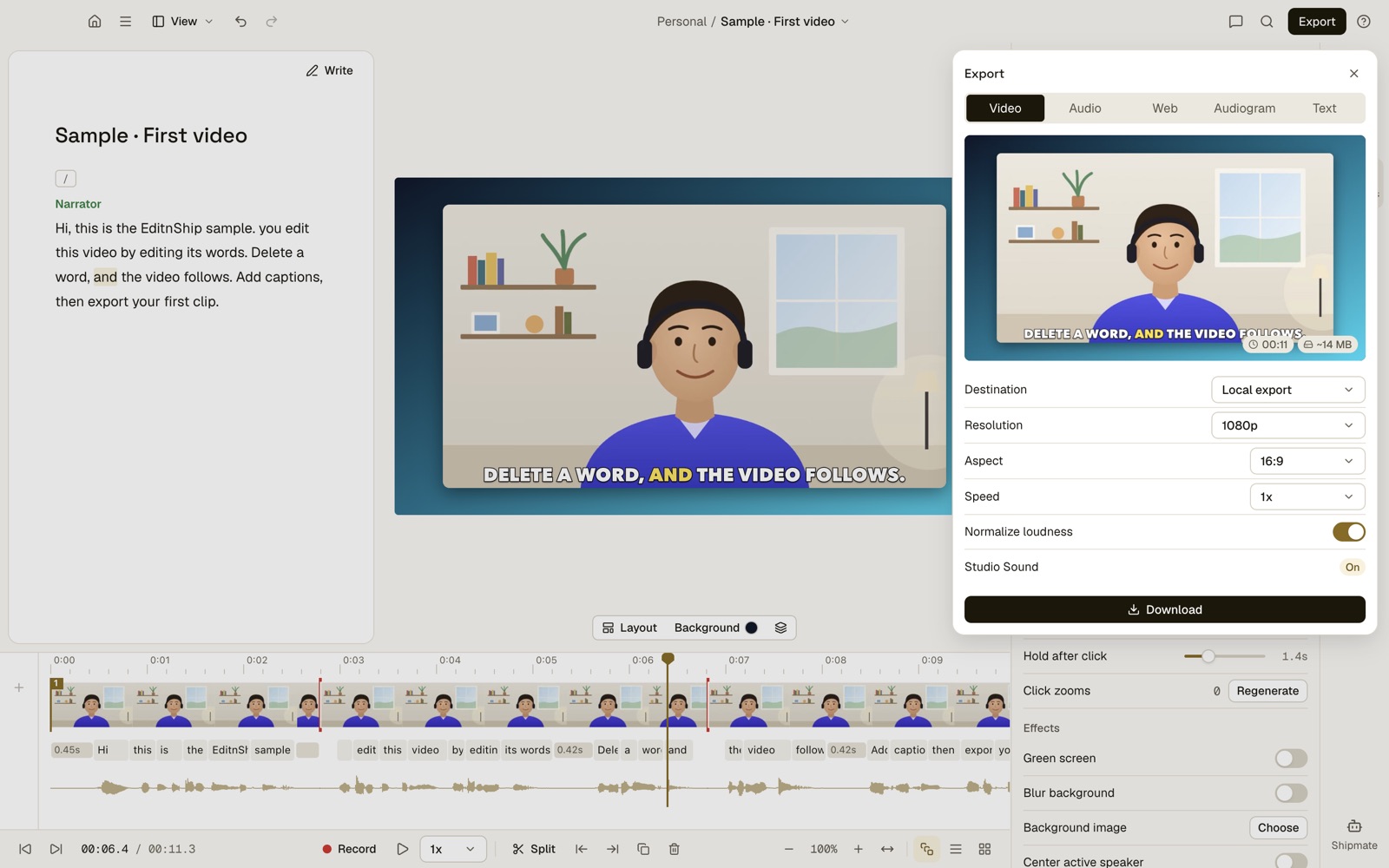
What to notice: the Download button saves the file to your Mac. Nothing is uploaded. Normalize loudness evens out the volume. This one is set to 1080p, but the same list goes up to 4K.
What it costs, and what an AI key is
The Mac app is $29 once, with updates included.
With no AI key, you can still do the everyday jobs. Transcribe on your Mac, cut by text and remove filler words. Clean up sound, add captions and export in 4K.
An AI key is a code you get from an AI company such as OpenAI. You paste it into EditnShip, and that company bills you for what you use.
The key turns on the AI tools, like Shipmate, the AI helper you type requests to. The cover screenshot shows a "Your OpenAI key" badge, because that capture used my own key.
Prefer AI credits included? There are also monthly plans with AI credits, sold separately. Credits pay for Shipmate, and 100 credits cover 100+ edits.
The prices are on the pricing page.
What "one-time setup" means
You need internet three times: to download the app, to activate it, and to download the speech model once.
After that, editing, transcription, filler removal and sound cleanup work offline. AI features still need internet.
How to install EditnShip
It's a .dmg, a disk image you double-click to open. You get it by a private link after you buy.
Drag it to Applications, then follow my first-video tutorial.
When Descript Is the Better Pick
I'd rather you know these now than after you buy:
- You have an Intel Mac. Descript runs on Intel 7th Gen and newer. EditnShip doesn't run on Intel at all.
- You also use Windows. Descript has a Windows app. EditnShip's app is Mac only.
- You edit with a team. Descript has shared drives (team folders), and live cursors on Business, so you see where others are editing. EditnShip is for one person.
- You interview people remotely. Descript's Rooms records calls with up to 10 people. EditnShip can't.
- You want Eye Contact or AI green screen. Descript has both. EditnShip can blur your background or remove a real green screen.
- You need many languages. Descript translates captions into 61 languages. EditnShip works in 15, English included.
- You want to try before you pay. Descript has a free plan. EditnShip doesn't.
When EditnShip Is the Better Pick
- You edit alone on an Apple silicon Mac. That's exactly who I built it for.
- Your internet is slow or patchy. Editing, transcription, filler removal and sound cleanup work offline after the one-time setup.
- You care about privacy. In the Mac app, your projects stay on your Mac. On-device transcription never uploads your video. If you use an AI key, what you ask the AI, plus the transcript it needs, goes to that company. More in AI video editing and privacy.
- You keep running out of credits. Filler removal and sound cleanup never use them.
- You'd rather pay once. The Mac app is $29, with 4K export and no media hours to run out of.
Want a wider view first? See EditnShip vs Descript, with the full credit math.
The Verdict
Get Descript for Mac if you have an Intel Mac, work with a team or record remote guests. Download it only from descript.com/download.
Get EditnShip if you edit alone on an M1 or newer Mac and want it to work offline. The $29 Mac app does the everyday jobs.
My advice: check the Chip line in About This Mac first. That one line decides most of it.
Frequently Asked Questions
Is there a Descript app for Mac?
Yes. Descript has a desktop app for Mac that you download from descript.com/download. It needs macOS 14 or later and runs natively on Apple silicon, and on Intel 7th Gen or newer.
How do I download Descript on my Mac?
Go to descript.com/download and pick Mac. Unzip the file, drag Descript to your Applications folder, open it and sign in.
Is Descript in the Mac App Store?
No. Descript's Mac app comes from descript.com. On November 12, 2026, a copycat listing came from Driftwave Labs LLC. It never said it was connected to Descript.
Why can't Descript record my screen on a Mac?
Usually macOS hasn't given it permission yet. Open System Settings, then Privacy & Security, and turn on Descript under Screen Recording, Camera and Microphone.
What are Descript's Mac system requirements?
macOS 14 or later, an M1 or newer chip or an Intel 7th Gen chip, and at least 8 GB of memory. Descript recommends 16 GB, 20 to 40 GB of free space and a 50 Mbps connection.
Can I use Descript on Mac without internet?
No. Descript's help center says it doesn't support offline editing, and transcription starts after your file uploads. Sign-in also runs through your web browser.
Is the Descript Mac app free?
The download is free. The Free plan gives 1 media hour a month and 100 credits once, at 720p with a watermark. Paid plans cost $16 to $65 a month per person.
Why does Descript open when I start my Mac?
Descript launches at login so its Screen Recorder stays in the menu bar. To stop it, click the Descript menu bar icon, choose Settings and turn off Launch at login.
How do I uninstall or reinstall Descript on a Mac?
Quit Descript, then quit its Screen Recorder from the three dots in its menu. Delete Descript from Applications. To reinstall, download the latest version from descript.com/download/mac.
Can I use Descript on an iPad or iPhone?
No. Descript says it doesn't work on mobile, and iPads aren't officially supported. Use a Mac or Windows computer, or Descript for Web in a desktop browser.
Now I'd like to hear from you: which Mac are you editing on, and does your internet ever slow you down? Email me, and I'll answer every one.
About the author
RH Fardin
I'm an SEO and growth marketer and web developer, and I build and market EditnShip myself. I've spent 5+ years on 120+ projects for 50+ clients.
Sources
- Descript download page and Mac download, read November 12, 2026
- Descript: download and install, read November 12, 2026
- Descript system requirements, read November 12, 2026
- Descript blog: native Apple silicon support, updated July 29, 2026, read November 12, 2026
- Descript: save your work to the cloud and transcription, read November 12, 2026
- Descript Studio Sound, read November 12, 2026
- Descript pricing, read November 12, 2026
- App Store listing by Driftwave Labs LLC (address: descript-ai-editing-tool), read November 12, 2026
- Apple: Mac computers with Apple silicon, read November 12, 2026
- Descript Version 30 release notes, checked on November 12, 2026
- Descript: use Descript on desktop, checked on November 12, 2026
- Descript: cancel your plan, checked on November 12, 2026
- FileHorse Descript listing and Does It ARM Descript page, checked on November 12, 2026
- EditnShip pricing, terms and privacy
Checked on November 12, 2026. Prices and requirements change often, so check before you buy. All product names are trademarks of their owners, shown here to identify their products. EditnShip isn't affiliated with Descript.
Related: EditnShip vs Descript · 10 best Descript alternatives · Descript review · best AI video editors for Mac · best screen recorders for Mac