Does Descript Work Offline? What Needs Internet (2026)
 RH FardinMaker of EditnShip · Updated November 17, 2026
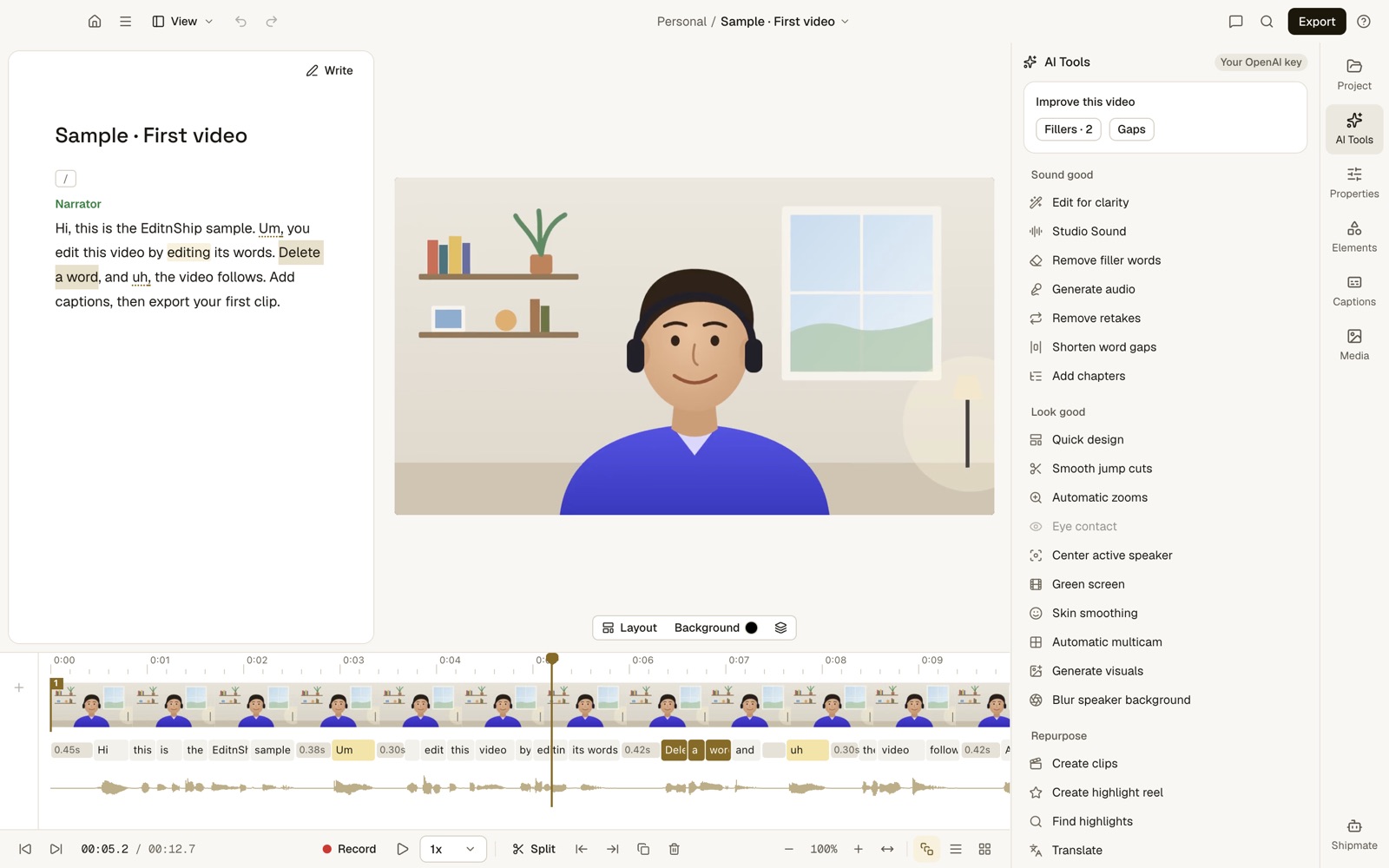
An offline text-based editor at work: EditnShip on a Mac, with the transcript on the left and the video in the middle. Editing like this runs on the Mac, so it works with Wi-Fi off.
You're on a plane, a train or slow hotel Wi-Fi. You open Descript to finish a video.
Does Descript work offline? Can you still edit?
Most answers online are forum complaints or quick guesses. This one comes from Descript's own help center and feedback board, checked on November 12, 2026. You'll also get 6 steps that help on bad Wi-Fi, and the tools that do work offline.
One thing first: I built EditnShip, one of those offline tools. So I'll also tell you where Descript is still the better pick.
Let's get started.
Descript Offline: Key Takeaways
- Descript needs internet to edit at all. There's no Save button. Every edit goes to Descript's servers the moment you make it.
- Descript asks for 50 Mbps down and 10 Mbps up. Your video uploads to Descript before transcription starts.
- Two offline requests were shut down on December 12, 2025. Descript said full offline support is unfeasible in the near term, and closed a request to keep original files off its cloud.
- Offline editors exist. Audapolis is open-source, MacWhisper does transcripts only, and EditnShip edits on your Mac after a one-time setup online.
Descript vs EditnShip with no internet
| Job | Descript, offline | EditnShip Mac app, offline |
|---|---|---|
| Edit a project | No. Its help center says so | Yes. Projects live in your Movies folder |
| Save your work | No. Edits save to Descript's servers | Yes. Saved on your Mac |
| Transcribe | No. Starts after the file uploads | Yes, after a one-time 1.6 GB download |
| Remove filler words | No, since editing needs internet. Also uses AI credits, English only | Yes. 5 languages, no credits |
| Clean up your voice | No. Studio Sound needs internet | Yes. Apple's voice isolation on your Mac |
| Replace the background | No. Green Screen needs internet | Blur, or remove a real green cloth behind you |
| Record your screen | Uploads to the cloud as you record | Saves to your Mac. Needs macOS 15 |
| Export a video | Not clear. A network problem is one listed cause of failed exports | Yes, up to 4K, made on your Mac |
| AI helper | Needs internet | Needs internet |
Does Descript Work Offline? No, and Here's Why
Descript's help article on saving is clear. It says Descript doesn't support offline editing.
There's no Save button in Descript. Each edit is saved to Descript's servers the moment you make it. Descript calls this syncing.
So with no internet, your changes can't save or back up. You can't edit.
Descript's troubleshooting page says the same thing in other words. The app relies on internet for many key features.

Official Descript screenshot, from descript.com.
Did Descript ever work offline?
Long-time users say yes. On Descript's feedback board, they say the older desktop app could edit local files offline.
That changed when Descript rebuilt its desktop app on the same code as its web app. Now both work the same way, online. My Descript for Mac guide covers the desktop app in full.
On December 12, 2025, Gabe Michalski from Descript answered the offline request. He said the current design makes full offline support unfeasible in the near term.
His reasons: team members can open and sync projects more easily. It also lets Descript process files on its servers, including some AI tools.
When I checked on November 12, 2026, the request had 91 votes. Comments were still coming in as late as August 2026.
A second request, "Option to not upload original file to the cloud", was closed the same day. Descript said it has "moved to full cloud-based file storage". That request had 54 votes.
The bottom line?
Don't plan on Descript working offline any time soon.
What Doesn't Work in Descript Without Internet?
Almost nothing works. Saving edits, transcription, Studio Sound, Green Screen and screen recording uploads all need a connection.
Here's each one, straight from Descript's help pages.
Opening and editing projects
Descript stores your projects and your original files online. Its system requirements say slow internet can delay uploads, project loading and restoring older versions.
With no internet, you can't edit, because edits can't save.
Transcription
Transcription means the app types out everything you say. In Descript, it starts after your file finishes uploading to the cloud.
So a long video on slow Wi-Fi means a long wait before you can edit a single word.
Studio Sound
Studio Sound is Descript's voice cleanup. Its help page says it requires an internet connection.
It also costs AI credits on current plans. Descript charges up to 30 credits per file, each time you run it. My Descript pricing breakdown shows what that means per plan.
Green Screen
Green Screen removes your background with AI. Descript's tip for it is simple: stay connected to the internet.
Screen recording
Descript's Screen Recorder uploads your recording to the cloud while you record. On a slow connection, the upload progress may pause or dip.
If an upload fails, Descript says it will try to recover the recording.
Exporting
Descript's help pages don't say if exporting works offline. Its export troubleshooting page does list a network problem as one reason an export can fail.
So I can't give you a firm yes or no here. Since you can't edit offline anyway, finish and export while you're online.
How Much Internet Does Descript Need?
Descript's system requirements give a minimum: 50 Mbps download and 10 Mbps upload.
Mbps means megabits per second. It's the number a speed test shows you.
Here's why the upload number matters most:
Your video has to travel from your Mac to Descript before transcription starts. A slow upload means a slow start.
Before you travel, run a speed test on the Wi-Fi you'll use. If the upload is under 10 Mbps, expect to wait.
Stuck With Descript on Bad Wi-Fi? 6 Steps That Help
You can't make Descript work offline. But these steps cut the waiting on a weak connection.
Why does Descript say I'm offline?
Descript's network help page gives three causes. Your connection may be unstable, or a network setting may block Descript. Sometimes it's a false alert.
The steps below cover all three.
Step #1: Upload before you leave. Add your files while you're on good internet. Wait until they finish uploading and the transcript appears.
Want to watch or rough-cut on the plane? On Creator and higher plans, a Timeline export gives you a folder with copies of your media. It opens in editors like Final Cut Pro or DaVinci Resolve.
Step #2: Watch the sync icon. While Descript saves, a spinning icon shows in the top-left corner. Hover over it to see the status.
You can keep editing while it syncs. Just don't close the app until it stops.
Step #3: Quit, reload or restart. Pick Quit Descript Completely from its menu, then open it again. You can also reload with Shift + Cmd + R, or Window > Reload. Still stuck? Restart your Mac.
Descript's last fix is Help > Debug > Reset app data. Wait until the sync icon stops first. Descript doesn't say whether this keeps edits that haven't saved yet.
Step #4: Check your VPN and disk space. If you use a VPN, a firewall or a proxy, Descript says it can block the app. Turn it off for a minute. Descript also asks you to keep at least 20 GB of disk space free.
Step #5: Try another network or app. A phone hotspot is one option. Descript also says a cable to your router is often steadier than Wi-Fi. Or switch between the desktop app and the web app at web.descript.com.
Careful with a hotspot, though. Descript uploads your whole original file, so a big video can use a lot of your phone's data.
Step #6: Check Descript's status page. Sometimes the problem is Descript, not your Wi-Fi. Its page at status.descript.com shows whether editing, file upload or transcription is down.
Traveling abroad? Descript's network page says it may be unavailable or limited in places under US sanctions or trade rules. Its list includes China and the United Arab Emirates.
One more tip saves credits. Run Studio Sound once, on your final cut, while you're online.
Is There a Descript Alternative That Works Offline?
Yes. A few text-based editors run on your own computer, so they keep working with Wi-Fi off. Here are the ones I'd look at (checked on November 12, 2026):
- Audapolis. A free, open-source editor for spoken audio and video. You edit the transcript like a document, and its makers promise "no cloud whatsoever". It runs on Mac, Windows and Linux. Updates are slow: the latest release, v0.3.1, came out in November 2025.
- MacWhisper. Transcripts only, no video editing. It transcribes on your Mac with local models. There's a free version and a one-time Pro license.
- EditnShip. My own Mac app. It edits video by text and runs the everyday jobs on your Mac. Details below.
Prefer a classic timeline editor to text editing? See Descript vs iMovie and Descript vs Final Cut Pro. My list of Descript alternatives compares 10 tools.
How EditnShip works offline
I built it after my own Descript credits ran out. On the basic plan, I paid about $25 a month, and two or three videos used up my credits.
So I made the everyday jobs in EditnShip run on the Mac itself.
Your projects are saved in your Mac's Movies folder. Your license is saved on your Mac too.
Once it's there, it stays valid offline. A failed check, like having no Wi-Fi on a long trip, never locks the app.
You need a Mac with an M1 chip or newer and macOS 14 or later. A 2020 MacBook Air with M1 counts. To check yours, click the Apple menu, then About This Mac.
Here's how to set it up for offline work, in 5 steps.
Step #1: Download the speech model once
EditnShip can type out your words on your Mac. It needs one download of a speech model, about 1.6 GB.
Open Settings, then the Transcription tab. Set Provider to On device. The On-device model row downloads it once, so do this before you leave.
After that, your video never leaves your Mac to be transcribed. More in my guide to transcribing video on a Mac.
To be fair, I haven't published a timing test yet. So try a short clip first, and see how long your Mac takes.
Step #2: Edit by deleting words
EditnShip is a text-based editor, like Descript. Delete a word in the transcript, and the video cuts with it.
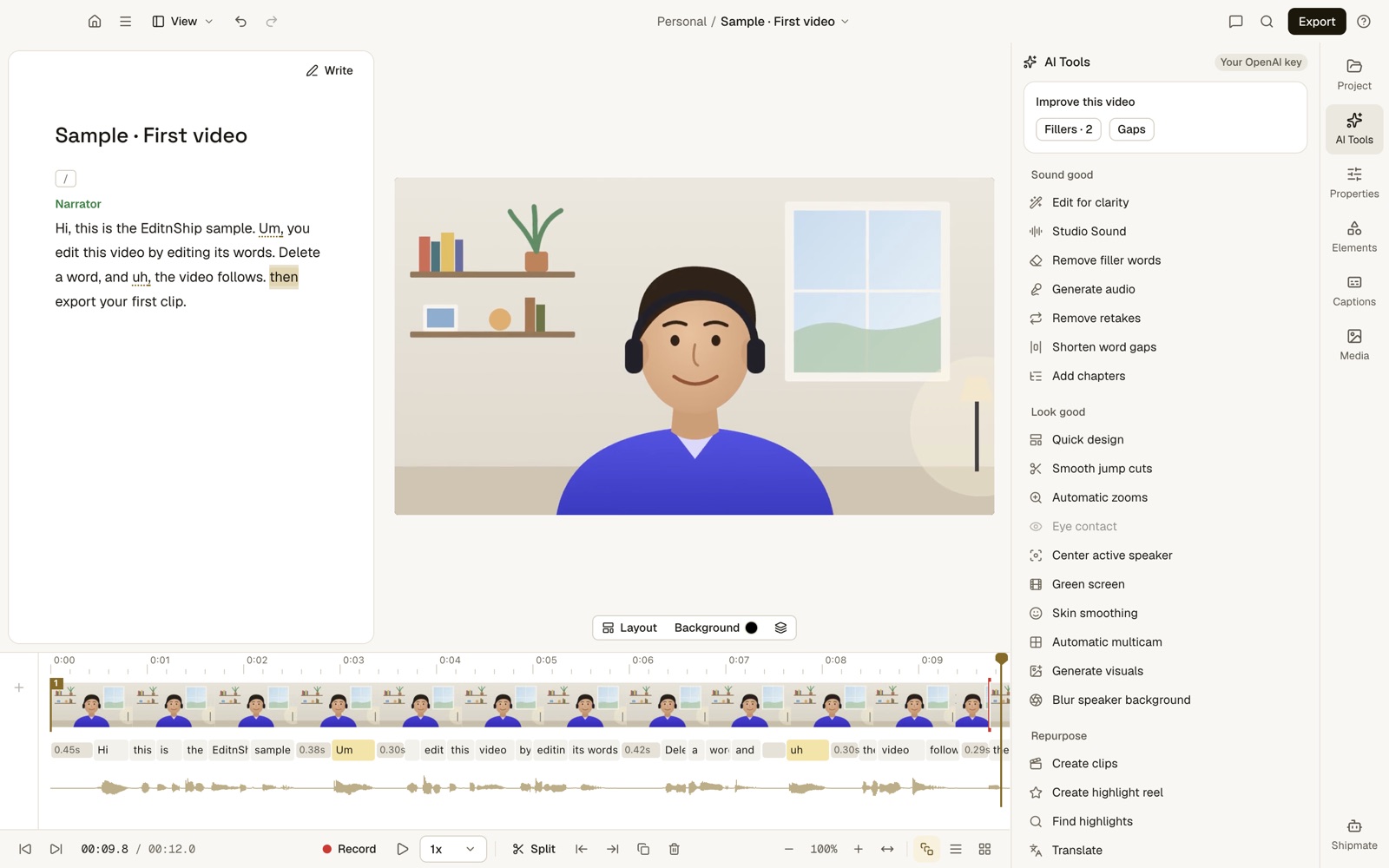
What to notice: "Add captions," is gone from the transcript, and the video is now 12.0 seconds. The cut is made on your Mac, so it works with Wi-Fi off.
Step #3: Remove filler words
EditnShip finds ums, uhs, stutters and phrases like "you know". It uses the word timings, meaning the exact moment each word starts and ends in your transcript.
It works in English, Spanish, French, German and Portuguese. It doesn't use an AI service or credits, so it works offline. See how to remove filler words for the full walkthrough.
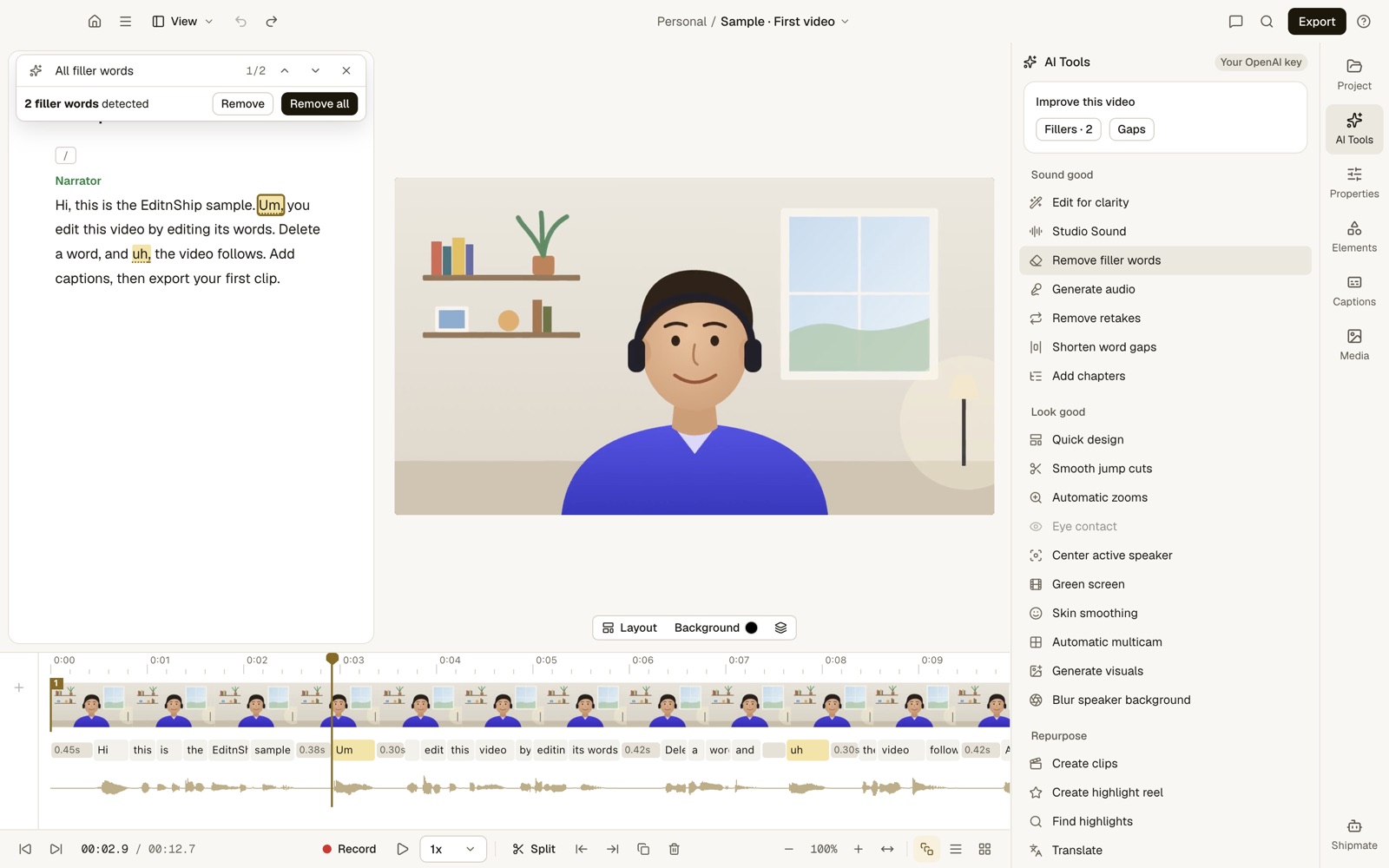
What to notice: 2 fillers found, both highlighted. Remove all cuts them in one step. The "Your OpenAI key" badge shows my own AI key was connected, but filler removal doesn't use it. In the list, the greyed-out Eye contact doesn't work. Green screen removes a real green cloth behind you, not AI background removal.
Shorten pauses works the same way. It trims long gaps between words.
Step #4: Clean up your voice
Sound cleanup uses Apple's voice isolation on your Mac. You pick Low, Medium or High strength.
You can play the original and the cleaned-up sound before you keep it. No internet and no credits. More in my guide to voice sound cleanup.
One honest note: I haven't run a listening test against Descript's Studio Sound. So EditnShip wins here on offline use and cost, not on proven quality.
Step #5: Add captions and export
Captions are made from your transcript, so they need no internet. You can style them and burn them in, meaning they become part of the video itself.
EditnShip then makes the final video on your Mac. You can export up to 4K as standard video files, even in the $29 app.
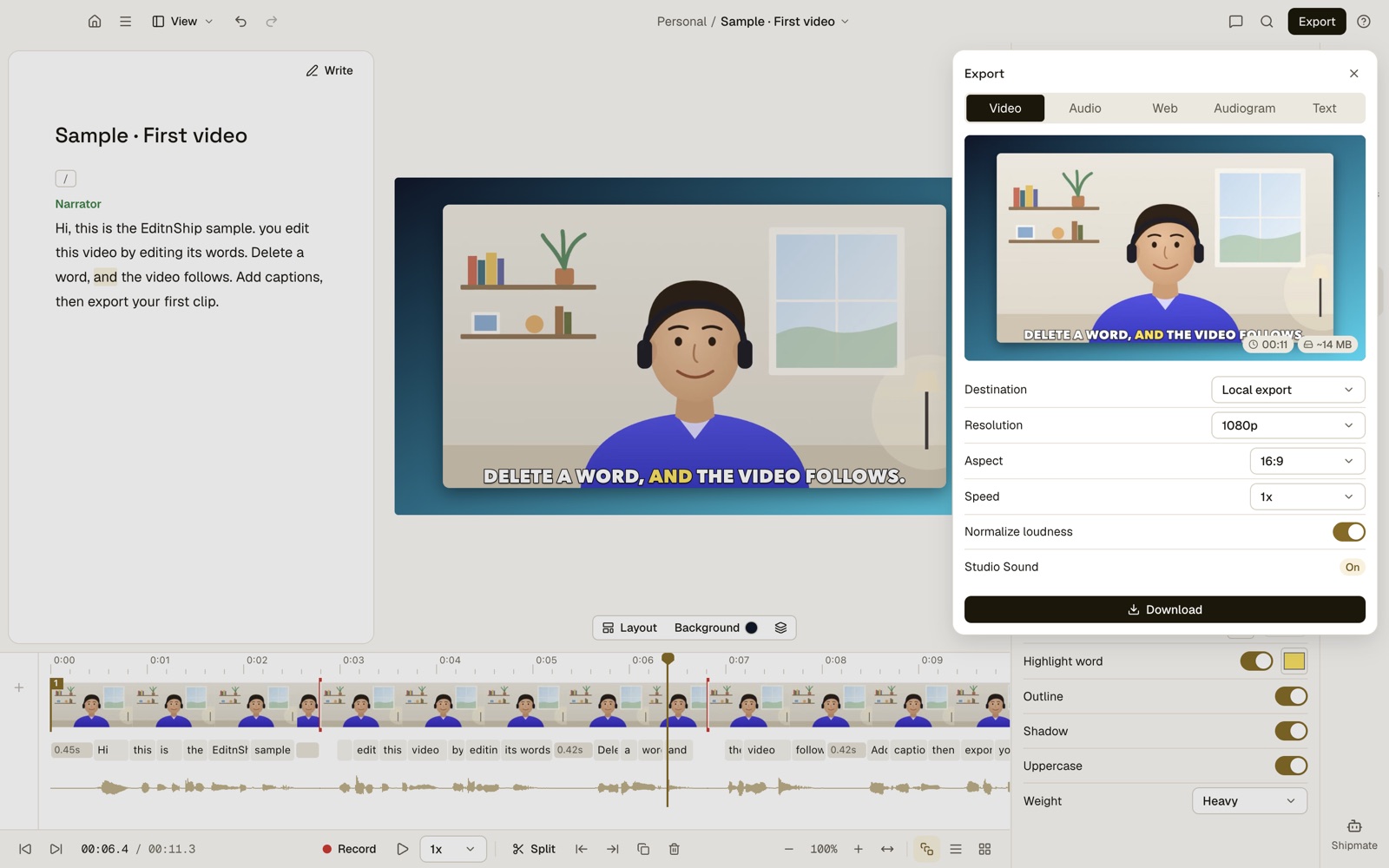
What to notice: the destination is Local export, so the file goes to your Mac. The Download button saves it there, with no internet needed. The preview shows burned-in captions on an 11-second video of about 14 MB. The Studio Sound row is the app's label for its own sound cleanup.
Recording also saves to your Mac. That covers camera, screen and audio recordings. Screen recording needs macOS 15.
Do you need an AI key for any of this?
No. Transcribing on your Mac, filler removal, sound cleanup, captions and export need no AI key and no credits.
A key or a plan's credits only matter for AI features like Shipmate.
What still needs internet in EditnShip
Not everything works offline. You need internet for these:
- Getting started. Buying the app, signing in once for your license and downloading the speech model.
- AI features. Shipmate, the AI helper you type requests to, needs your own AI key or a plan's credits.
- Translation and dubbing. Both use online services.
- Sharing. Publishing to YouTube, stock video search and Auto Post.
- The browser editor. Monthly plans include one at app.editnship.com, and it runs online.
When Descript Is Still the Better Pick
If you're almost always online, Descript's cloud has real upsides. Pick Descript when:
- You use Windows. Descript has a Windows app. EditnShip is Mac only.
- You edit with a team. Online projects make sharing easy. EditnShip is for one person.
- You interview people remotely. Descript's Rooms records up to 10 people. EditnShip can't.
- You want AI extras. Descript has Eye Contact and an AI Green Screen. EditnShip has neither.
- You switch computers a lot. Your Descript projects follow you to any device you sign in on.
For the full side-by-side, read EditnShip vs Descript.
The Verdict
Descript doesn't work offline. Editing, transcription, Studio Sound and Green Screen all need internet, per its own help center.
Pick EditnShip if you edit alone on a Mac and want to work on planes, trains or bad Wi-Fi. The $29 Mac app transcribes, cuts, cleans up sound, adds captions and exports with Wi-Fi off.
Add a monthly plan only if you want AI credits for Shipmate included. See the pricing page for the monthly plans with AI credits.
Stay with Descript if you need Windows, a team or remote guests.
If online-only is a deal breaker for you, here's how to cancel your Descript subscription.
Frequently Asked Questions
Can I use Descript without internet?
No. Descript's help center says it doesn't support offline editing. You need internet for your edits to save and your project to back up.
Does the Descript desktop app work offline?
No. The desktop app saves every edit online, just like the web app. Users say an older version could edit offline, but that went away.
Does Descript work on a plane?
Only if the plane's Wi-Fi is fast enough, since every edit has to sync. Descript asks for 50 Mbps down and 10 Mbps up. With no Wi-Fi, use an editor that runs on your computer.
Why does Descript say I'm offline?
Descript says your connection may be unstable, or a network setting such as a VPN may block it. Sometimes it's a false alert. Quit Descript completely, reload with Shift + Cmd + R, or try another network.
Will Descript add an offline mode?
Not soon, it seems. On December 12, 2025, Gabe Michalski from Descript said full offline support is unfeasible in the near term. The request had 91 votes on November 12, 2026.
Does Descript upload my files to the cloud?
Yes. Descript says it has moved to full cloud-based file storage, and transcription starts after your file uploads. In December 2025 it closed a request for an option to keep original files off the cloud.
What happens to my Descript edits if the internet drops?
Descript doesn't say. Its help center says edits need internet to sync, and you can keep editing while a sync is in progress. Keep the app open until the sync icon in the top-left corner stops spinning.
Do Descript transcription and Studio Sound work offline?
No. Transcription starts after your file finishes uploading to the cloud. Studio Sound requires an internet connection, per Descript's help page, and uses AI credits each time you run it.
Can I export from Descript without internet?
Descript's help pages don't say. Its export troubleshooting page lists a network problem as one cause of failed exports. Since editing needs internet, export while you're online.
Is there a text-based video editor that works offline on Mac?
Yes. Audapolis is a free, open-source option. EditnShip is a $29 Mac video editor that edits by text. After a one-time 1.6 GB download, it transcribes, cuts, cleans up sound and exports with no internet.
Now I'd like to hear from you: where do you most often need to edit without internet? Email me, and I'll answer every one.
About the author
RH Fardin
I'm an SEO and growth marketer and web developer, and I build and market EditnShip myself. I've spent 5+ years on 120+ projects for 50+ clients.
Sources
- Descript: Save your work to the cloud, read November 12, 2026
- Descript: How to resolve network connection issues, read November 12, 2026
- Descript system requirements, read November 12, 2026
- Descript transcription, read November 12, 2026
- Studio Sound, Green Screen and filler words, read November 12, 2026
- Descript Screen Recorder and export troubleshooting, read November 12, 2026
- Descript: media minutes and AI credits and Descript pricing, read November 12, 2026
- Descript feedback board: true offline mode, with Gabe Michalski's team reply of December 12, 2025, read November 12, 2026
- Descript feedback board: Option to not upload original file to the cloud, 54 votes, closed December 12, 2025, checked on November 12, 2026
- Descript: Timeline exports and Descript status page, checked on November 12, 2026
- Audapolis on GitHub and its releases, checked on November 12, 2026
- MacWhisper, checked on November 12, 2026
- EditnShip pricing, and EditnShip's own settings and license code for the offline steps, checked November 12, 2026
Checked on November 12, 2026. Features and prices change often, so check before you buy. All product names are trademarks of their owners, shown here to identify their products. EditnShip isn't affiliated with Descript.
Related: EditnShip vs Descript · Descript for Mac · Transcribe video on your Mac · 10 best Descript alternatives